Yes, you can download a public TikTok video for personal and offline use. But Tiktok’s terms suggest that users should get permission from creators first. However, reposting someone else’s reel without giving him credit or using it for commercial purposes can create copyright issues.
Blog
5 Best TikTok Downloader: How to Save TikTok Videos in 2026
A TikTok downloader allows you to save a video clip with a public view directly to your device. TikTok app has a built-in Save Video button and third-party websites go an extra mile. These offer to download video TikTok in MP3 and MP4 formats even without a watermark.
Here you will learn how to use both ways to download TikTok videos, third-party websites, important facts, and safety rules.
Quick Answer
What are the best TikTok downloaders?
A TikTok downloader lets you save TikTok videos into your device which you watch offline.
Here are the best TikTok downloaders in 2026.
i) MusicalDown
ii) SaveTT
iii) SnapTik
iv) SSSTikTok
v) TikMate
Note: These steps work exactly the same on a phone, desktop browser, or a tablet.
Table of Contents:
5 Best TikTok Downloaders in 2026
A TikTok downloader allows you to save videos so that you can watch them offline. Most downloaders are websites thus you need not install any extra app. You can even download videos without a watermark.
Here are some of the best TikTok downloaders in 2026
| TikTok Downloader | Watermark | Works On |
| MusicallyDown | No | Both desktop and mobile |
| 4K Video Downloader+ | No | Both desktop and mobile |
| SnapTik | No | Both desktop and mobile |
| SSTik | No | Both desktop and mobile |
| TikMate | No | Both desktop and mobile |
There are a lot of available tools that follow the same link pasting method. Knowing their names and specialities is important even without using them individually.
- TikMate: This is both a downloader website and an app that gives you watermark-free videos and audio from a TikTok clip.
- SSTik: It is a completely free web tool that separately handles TikTok to MP3 audio conversion.
- MusicallyDown: This web downloader is an ad-supported site that does not have download limits.
- 4K Video Downloader+: Use this website to download not only TikTok videos but also for Instagram, YouTube videos, Facebook, and SoundCloud.
- SnapTik: SnapTik allows you to download TikTok videos in HD quality and MP4 format without a watermark. There’s no need to install any software; you just download your videos directly from your browser.
In order to use these tools just copy the link of a TikTok video that you want to download and paste it into the downloader’s search box. Choose the format and download quality accordingly.
How to Use a TikTok Downloader
There are two different ways to use TikTok downloader; one is a third party website to download an MP3 or MP4 file without any watermarks, and another is TikTok’s own save button. Both of these methods work perfectly on Android, iPhone, and web browsers. They do not need any log in to another application.
How to Save a Video With TikTok’s Official Save Button
Here is how to use TikTok’s save button approach. It is the fastest way to download video TikTok in the app only;
- Go to the TikTok app and click the video that you want to save.
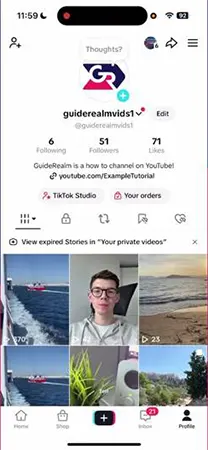
- Click the Share symbol (the arrow) at the right below.
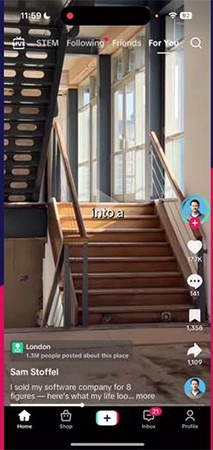
- Click the Save Video option from the menu.
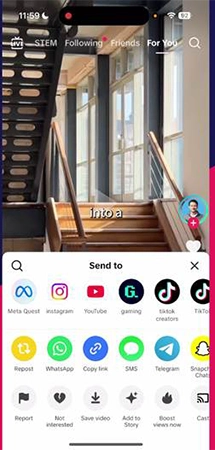
Note: If you can’t see the Save Video option for a video it means the creator has disabled it. TikTok shows “Download is not available for this video”.
TikTok’s Save button works the same on both the TikTok app and its web browser on a computer. Thus, it is not always mandatory to go for any third-party TikTok website.
Download a TikTok Video Without Watermark
Use SnapTik to download TikTok videos without much ad interruption. It is a completely free tiktok downloader website which works without installing any application and removes watermarks too.
Follow these steps to use it;
- Go to TikTok and click Share just to copy the clip link you want to download.
- Open the SnapTik website on your browser and paste the same link in the search box.
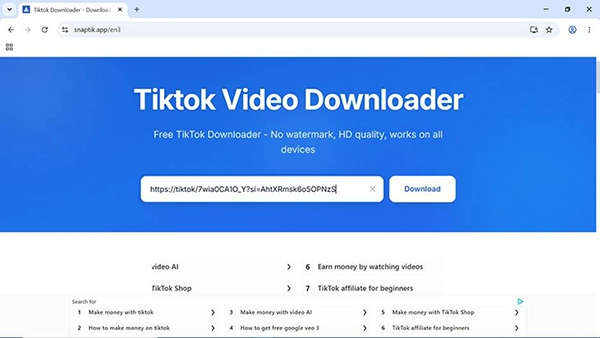
- Click Download
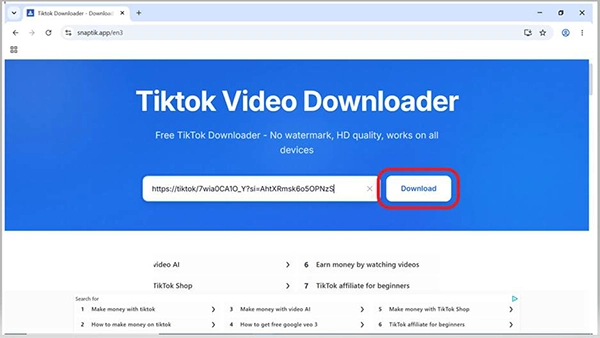
- Now click on the first option Download video (with no watermark)
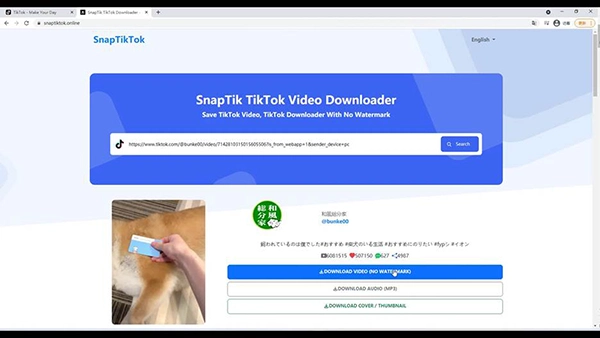
Note: All the websites follow the same paste the link and download steps so learning how to use any one of them makes the rest easy to use.
TikTok Downloader Websites and Apps
There are a lot of available tools that follow the same link pasting method. Knowing their names and specialities is important even without using them individually.
- TikMate: This is both a downloader website and an app that gives you watermark-free videos and audio from a TikTok clip.
- SSTik: It is a completely free web tool that separately handles TikTok to MP3 audio conversion.
- MusicallyDown: This web downloader is an ad-supported site that does not have download limits.
- 4K Video Downloader+: Use this website to download not only TikTok videos but also for Instagram, YouTube, Facebook, and SoundCloud.
What to Know Before Downloading TikTok Videos
Before you proceed to download video TikTok files, here are a few facts that you must know.
- The creators have control over downloads. If they have blocked this setting, users will not be able to see the download button for that video.
- Downloaded files are not just for personal use. Reposting the same elsewhere without giving credit to the real creator will have copyright issues.
- TikTok downloader websites can only download videos set for public view. Private or restricted clips will not be assessed regardless of using any third-party tool.
- Mostly video quality limits at 1080 pixels; therefore, no tool can increase this quality, which the original file never had.
- TikTok’s terms of service do not allow users to download clips directly without getting the creator’s permission even when the download button is available in its official app.
Common Problems While Using a TikTok Downloader
Most TikTok video download issues are because of a slower server, blocked link, or even a watermark. No worries! Here are the quick solutions to these problems;
- Can’t see video save option: It means that the creator has disabled downloads to secure his data. You can either try on a downloader website or just directly ask the creator for it.
- Watermark still visible: Some websites work on the same version like official TikTok does. Thus you must use the one that gives MP4 quality even without a watermark.
- Download struck or failed: You should check your internet connection and refresh the page once. If this does not work, wait for some time and try again later as Tiktok’s servers frequently limit repeated attempts.
- Link not recognized: Once again copy the link using share option. Make sure you copy the clip’s link and not the browser’s web address bar.
Do’s and Don’ts of Using Downloaders
Make sure you keep these points in mind while using TikTok downloaders.
Do’s:
- Always use a reliable downloader website that starts with HTTPS.
- Make sure to confirm the video is public before you paste its link into a downloader website.
- Always give credit to the real creator if you repost a downloaded clip anywhere.
- Save your own videos separately before you post on TikTok so that you already have watermark free files.
Don’ts:
- Never use a third-party website that requires your TikTok username and password.
- Do not avoid “download disabled” creators use this setting to protect their data.
- Never install downloader applications apart from the Google Play or App Store.
- Do not use downloaded clips for commercial use without taking the creator’s permission.
Conclusion
A TikTok downloader allows you to keep a copy of a public TikTok video. No matter if you use a third-party website like SnapTik or its own save button. Go for the official option for quick and general purposes but use a reliable third-party website to get a watermark-free Tiktok to MP3 or MP4 clips. Always keep in mind to credit the creator while sharing his clips anywhere.
FAQs
Q1) Is it legal to use a TikTok downloader?
Q2) Is there any way to download a TikTok video without watermarks?
Yes, when you use Tiktok’s own video save button, it will always save the video with watermarks only. But there are some third-party websites like SnapTik or SSSTik that you can use to download tiktok videos as MP4 without watermark.
Q3) Do creators get notifications if I download their videos?
No, creators don’t get notified when you download their videos. No matter if you use TikTok’s own save button or third-party websites. This download activity always remains private to your device only.
Q4) Is it possible for a TikTok downloader to convert a video into MP3?
Yes, almost all third-party websites including TikMate and SSSTik allow users to download only audio versions of clips. This option converts Tiktok to MP3 files to use them for sounds or music tracks.
Q5) Can I download private TikTok videos?
No, there are no websites that allow users to download private videos. You can download public videos that anyone can access. Restricted clips and private videos remain inaccessible from every saving option. Neither TikTok’s download button nor third-party download sites can do it.
Q6) Which TikTok downloader works best in 2026?
In order to download TikTok videos with watermark but ad-free, use its own Save button for all public view videos. But if you wish for a watermark free tiktok video download, use either SSSTik or SnapTik free websites.
Sources:
TikTok Terms of Service by TikTok
Best TikTok Video Downloader guides by ScreenApp
Manage video downloads by TikTok
Related Post's