Not all premium offline watching works for most videos, but some may be restricted by the copyright holder. You may reuse Creative Commons content under its license.
Blog
How to Download YouTube Videos: MP3, MP4, and More
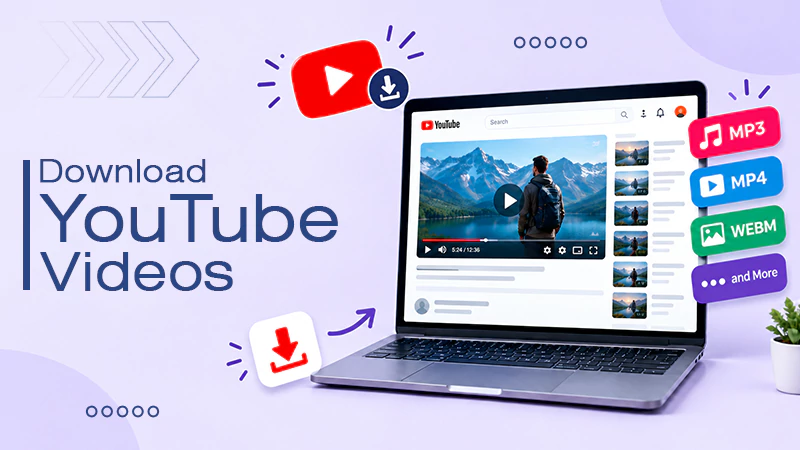
To download YouTube videos, install 4K Video Downloader Plus on your computer. Copy the link of the video you want to download, open the app, and click Paste Link. Select the format as MP4 and the video quality, then click Download.
Learn how to download YouTube videos as YouTube to MP4 files. Learn about video and audio quality, different formats, common problems when downloading content, and many YouTube video downloaders.
Quick Answer
How do I download a video from YouTube?
Follow these steps to download YouTube videos step-by-step:
1) Download and install a YouTube video downloader like 4K Video Downloader Plus.
2) Copy the link of the YouTube video and click Paste Link in the app.
3) Choose the format as MP4 and the quality accordingly.
4) Tap the download button.
Table of Contents:
- Can You Download YouTube Videos?
- How to Download YouTube Videos?
- How to Download Your Own Videos from YouTube as MP4?
- YouTube to MP3 Converter: How it works
- YouTube to WAV: What Conversion Actually Gives You
- What Is a YouTube Video Downloader?
- MP3 vs MP4 vs WAV: Which Format Should You Choose?
- How to Decide The Right Download Quality?
- Why Can’t I Download Some YouTube Videos?
- Common Problems When Downloading YouTube Videos
- Is It Legal to Download YouTube Videos?
- Conclusion
- FAQs
Can You Download YouTube Videos?
You can, but only under specific circumstances. YouTube clearly distinguishes offline viewing from saving a file. Confusion takes place online because people treat these two things as if they are the same.
- Offline Viewing: YouTube keeps an encrypted copy of the video on your device. You can watch it offline only through the YouTube app but cannot move or share the file.
- Saving a file: This means downloading an actual MP4 or audio file that you can keep and use. YouTube only allows this for videos you uploaded.
- Licensed reuse: Some videos are marked with Creative Commons Attribution (CC BY). You can reuse these videos if you give credit to the creator. YouTube supports this CC license only.
How to Download YouTube Videos?
In order to download YouTube videos, you need a YouTube video downloader. 4K Video Downloader Plus is a free desktop app for Windows, macOS, and Linux, and it is the one used in the steps below. If you would rather not install anything, browser-based converters such as ClipConverter and Y2Mate do the same job inside your browser, though they run on mirror domains that change often.
How to Download YouTube Videos With 4K Video Downloader Plus
Here is how to download YouTube videos with 4K Video Downloader Plus:
Download and install 4K Video Downloader Plus on your computer. It runs on Windows, macOS, and Linux.
Copy the URL of a YouTube video that you want to download.
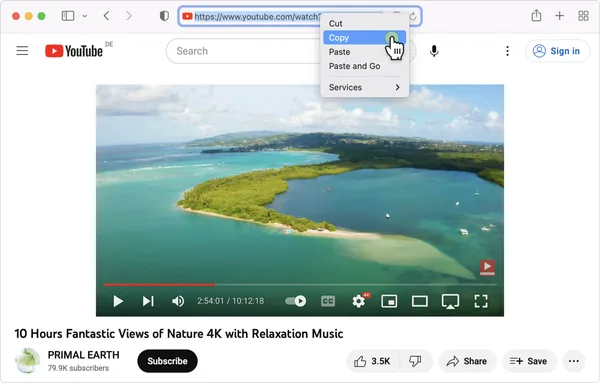
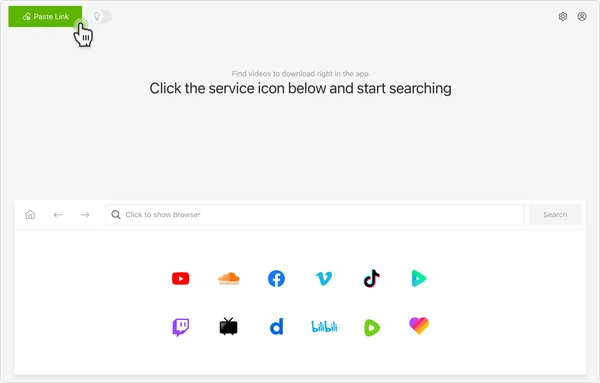
Open the app and click “Paste Link.”
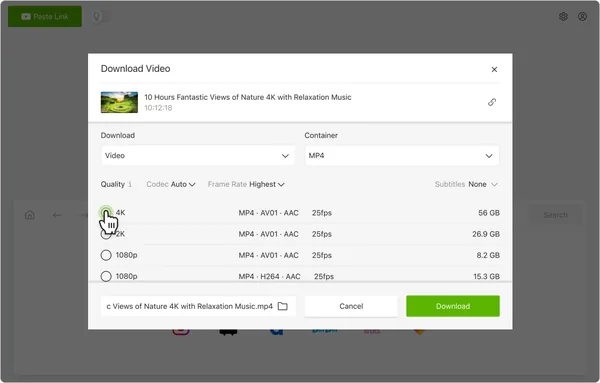
Choose the format as MP4 and the resolution as per your choice.
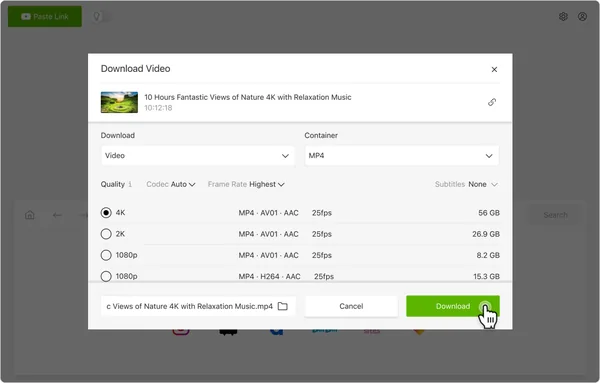
Click “Download.” The file is saved to the folder you selected.
Note: Download the app from the official 4K Download website only. Copycat download pages bundle extra software with the installer.
How to Download Your Own Videos from YouTube as MP4?
MP4 is a wrapper for video and audio data compressed into one file that plays on everything from phones and TVs to editors. This is the default format for YouTube’s content distribution.
How to Download a Video From a YouTube Channel on Desktop?
Follow these steps to download your own YouTube videos on a desktop browser.
Go to YouTube Studio in your browser.
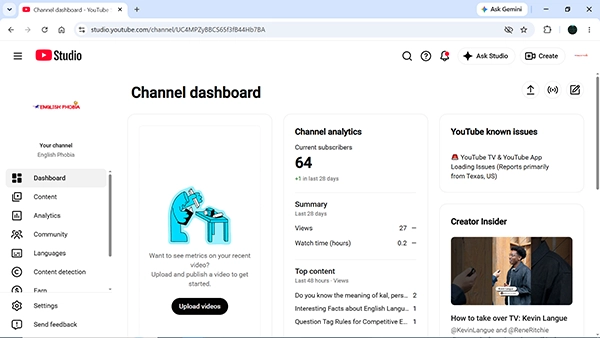
Click “Content” on the left sidebar.
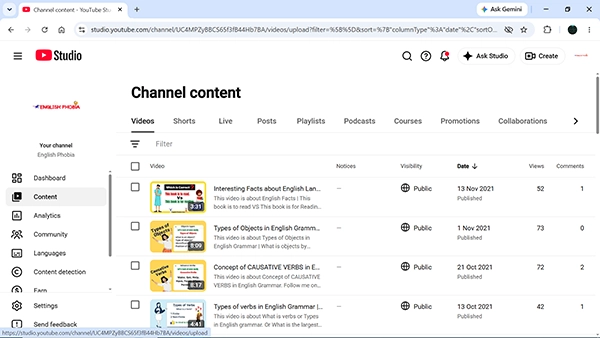
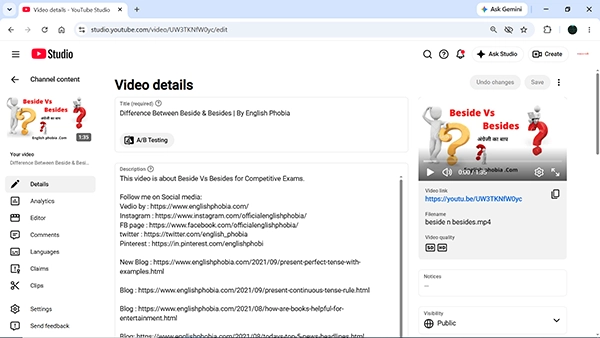
Choose any video you want to download from the list.
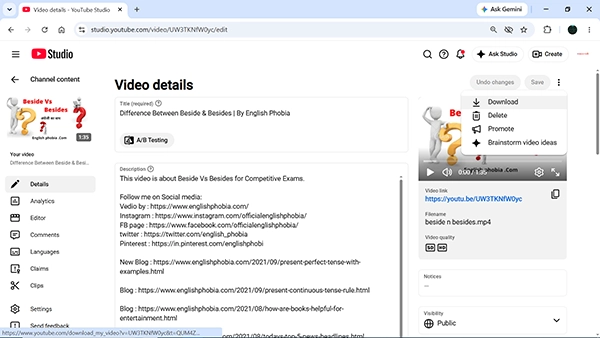
Click the three dots menu from the top right corner and tap “Download.”
How to Download YouTube Videos on Mobile?
Here is how to download YouTube videos on mobile:
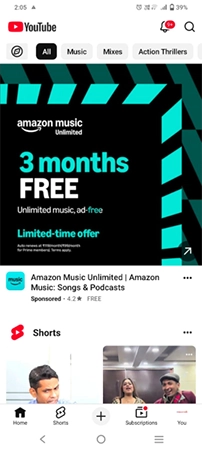
Open the YouTube app on your phone and click your profile picture at the bottom right.
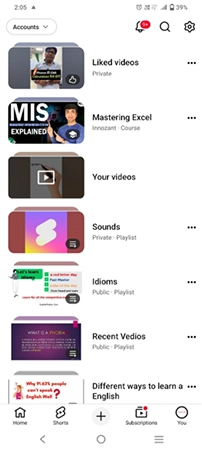
Tap the “Your Videos” section that has all your videos.
Click the three-dot menu of any video you want to download.
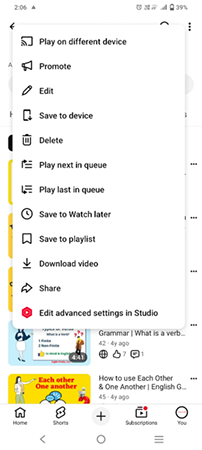
Hit “Save to device.”
MP4 does not provide any significant benefits over MKV or AVI. MKV is preferred for its extended support of audio and subtitle tracks. MP4 remains universally playable.
Important: The resolution may range from 720p to 360p, depending on the file size. The studio’s copies are always lower than the originals. You should use Google Takeout to get your original files without modifications.
YouTube to MP3 Converter: How it works
A YouTube to MP3 converter is a tool that extracts an audio track from a video. It not only decodes it but also converts it into an MP3 file. But this process comes with both a quality limitation and a legal problem.
- No MP3 exists to begin with: YouTube serves AAC and Opus, but not MP3. When you use a YouTube MP3 converter, it forces that video into an MP3 file.
- Generational Loss: When you convert compressed audio again, it means wasting your data. So if you turn a 128 kbps source into a “320 kbps” MP3, you are only getting a bigger file, but not better sound quality.
- Ceiling, not floor: A converter cannot make the audio better than the quality YouTube originally streamed.
- The Legal Issue: In Yout LLC v. RIAA, in 2022, a federal judge in Connecticut said that YouTube’s rolling cipher counts as a technological protection measure under the DMCA. The case was appealed to the Second Circuit, and the appeal remained unresolved into 2026.
YouTube to WAV: What Conversion Actually Gives You
Since the WAV file contains uncompressed PCM audio, nothing is removed during recording. That’s why it is a preferred format among editors, as there is no loss of file.
However, this advantage is not present in YouTube’s source. WAV files that are standard for CD quality have a 44.1 kHz sample rate, 16-bit depth, and are stereo.
Fact: A WAV file has 1411 kbps, or roughly about 10 MB per minute. In contrast, a YouTube stream has a maximum of 256 kbps.
Key insight: It is important to note that a YouTube-to-WAV conversion converts a 3 mb compressed file into a 30 mb file but does not improve its quality. The reason is that WAV is an archival format that maintains the quality of the file but cannot restore it.
Note: Use WAV when you are recording or mastering audio yourself. If the source is already compressed, there is no real benefit to converting it to WAV.
What Is a YouTube Video Downloader?
A YouTube video downloader refers to any tool that saves a stream to storage. This category of software is divided into two different groups that search results rarely split.
| Type | Examples | Status |
| Official | Premium subscription, YouTube Studio, Google Takeout, YouTube Music | Approved by YouTube |
| Third-party | Converter websites, browser extensions, desktop downloaders. | Breaks YouTube’s ToS |
Third-party converters will rely on aggressive networks of ads, while some browser extensions ask for permissions that can let them read or access the pages you visit.
MP3 vs MP4 vs WAV: Which Format Should You Choose?
You should always choose the format based on what you actually need, instead of simply going for the biggest file or highest quality settings:
| Format | Best for | Main advantage |
| MP3 | Music and spoken audio | Small files that work on almost any device |
| MP4 | Videos with sound | Widely supported across phones, computers, and TVs |
| WAV | Editing & professional audio work | Uncompressed audio with no quality loss from re-encoding |
How to Decide The Right Download Quality?
Higher resolution is better quality and significantly bigger in size. Google advises that downloading high-quality files takes time and consumes more storage.
Here is what you need to know before you start downloading on YouTube:
- 360p: It is good enough for headshots on a phone. It requires the least amount of storage.
- 720p: Best option for most viewing on phones and tablets.
- 1080p: Pick this if you need high-resolution videos, tutorials that have small print, or if you will cast to a television.
- Audio bitrate: Podcasts require 128 kbps, while 256 kbps is worth it for music in great headphones.
The biggest limiting factor is your storage. A couple of 1080p files can consume multiple gigabytes.
Note: First check your requirements and free storage on your device, then decide the quality accordingly.
Why Can’t I Download Some YouTube Videos?
The download button being absent or grayed out is normally a permissions problem and not an error:
- No premium: The button needs an active subscription and a logged-in account.
- Regional limits: The premium is not available in all countries, and there is a 48-hour offline period in some countries.
- Rights restrictions: Rightholders can prohibit offline viewing of certain movies, TV shows, and music videos.
- Wrong browser: Downloads on desktops from Safari are not possible.
- Removed content: Deleted and private videos are automatically removed from your devices on the next sync.
Common Problems When Downloading YouTube Videos
These common issues keep popping up and are mostly fixable to be resolved in one go:
- Download fails partway: Just connect to the internet again. The progress will continue on its own.
- Audio and video out of sync: It is caused by a faulty merge process in a third- party application, not an official download.
- Video looks soft: Studio puts the output limit at 720p or 360p. Use Google Takeout to get the original.
- Files too large: drop the resolution one notch down, or download audio alone if visuals are not important.
- No sound after conversion: It is mostly because of the absence of an audio codec in the output container.
Is It Legal to Download YouTube Videos?
It is okay to use YouTube’s controls. The YouTube terms of service permit viewing of personal, non-commercial purposes and prohibit users from bypassing, disabling, or interfering with any measure designed to prevent content copying.
Three problems can come together in one download:
- Contract: Ripping a file violates your agreement with terms.
- Copyright: Copying copyrighted content is reproduction. The YouTube copyright notice states clearly that “no infringement intended” statements hold no validity.
- Circumvention: Circumventing YouTube’s copy prevention system might have implications under the DMCA in the United States.
Permission will sort out all of these problems. Contact the copyright owner, or use CC BY and public domain content.
Conclusion
By now you have learned how to download YouTube videos. Understanding the right format depends on your need; MP4 for a video and for listening is MP3 files, and WAV for your own recordings.
Premium ads work best for offline viewing; Studio and Takeout will cover your own uploads, while CC BY focuses on reusing them. But you must check the rights first, as formatting becomes easier later on.
FAQs
Can I download any YouTube video?
How do I download YouTube videos as MP4?
Open YouTube Studio → click Content → find your content, then click “Download.” This will produce an MP4 in either 360p or 720p. Google Takeout rather exports the video file in its original size.
How do I download YouTube videos as MP3?
You need to use YouTube Music Premium, then go to Settings → Downloads & Storage and set the audio quality. The audio quality that Google offers is 48, 128, and 256 kbps. The file remains within the application and cannot be a standalone MP3 file.
Is MP3 or WAV better for YouTube audio?
You should use MP3 instead. YouTube streams content encoded using AAC or Opus and therefore is essentially a compressed format already. Therefore, converting your file to WAV would increase the file size by around ten times over and would not retrieve lost data from compression.
Can I download YouTube videos on my phone?
Yes, you can download videos using Premium by clicking “Download” on the selected videos in the Android and iOS apps. Now go to the library and click the Downloads playlist to watch offline on your mobile.
Are YouTube downloader websites safe to use?
No, YouTube downloader websites are not safe to use because most of them depend on pop-ups and intrusive ads. These create privacy and malware risks. They also go against YouTube’s guidance, so the safest option is to use either premium or, YouTube Studio, or Takeout.
Sources:
Watch videos offline with YouTube Premium by YouTube Help
Change your audio quality by YouTube Music Help
Download YouTube videos that you’ve uploaded by YouTube Help
Related Post's