No, Instagram does not send any notifications to users when you block them. The person can notice only if he is unable to find your profile, posts, or not getting my response in the chat thread.
Blog
What Happens When You Block Someone on Instagram in 2026
Want to know what happens when you block someone on Instagram? He will not find your profile in search results, send you messages, or see your highlights, stories, or posts. Instagram never sends notifications to the person. Your following connection disappears, but old chat remains available in your inbox.
Know what happens when someone blocks you on Instagram, blocked user sees, and difference between block, mute, and restrict.
Quick Answer
When you block someone on Instagram what happens?
When you block someone on Instagram, they can’t see your posts, stories, reels, or your profile in search results. They lose following connection with you and won’t be able to tag, mention, or message you. However, the old chat history is available in boht DM inboxes. But Neither of you can send a new message.
Table of Contents:
- What Happens When You Block Someone on Instagram?
- What the Blocked User Sees?
- What You See After Blocking
- What Happens When Someone Blocks You on Instagram
- What Happens to DMs, Group Chats, Likes, and Comments?
- How to Block Someone on Instagram
- What Happens When You Unblock Someone?
- Which One Fits You: Mute, Block, or Restrict?
- Dos and Don'ts of Blocking Someone on Instagram
- Conclusion
- FAQs
What Happens When You Block Someone on Instagram?
When you block someone on Instagram, your account no longer appears for them. They will not be able to get your posts, stories, or highlights nor do they receive any notification for being blocked from Instagram. According to Instagram now you have the option to block either a single account or their other existing or new accounts they may create.
What the Blocked User Sees?
This is what changes for the user you block on Instagram;
- They will not be able to see your stories, reel, highlights, or posts anymore.
- Your profile will not appear even when they search for your username correctly.
- They are removed from your followers list and so are you from theirs.
- If they try opening your profile using an old link, they will get either “No posts yet” or “User not found”.
- They will no longer be able to tag, send messages, or @mention you.
What You See After Blocking
Blocking shows impacts from both sides. You will not see their stories and posts in your feed or send them messages so can they. They will be available on your blocked list, and you can unblock them later if you wish to. However, common friends do not get any information about this as they will be able to see both profiles normally.
Note: Blocking does not mean complete invisibility. Users you block will be able to see your comments and likes on public accounts’ posts or from mutual accounts you both follow.
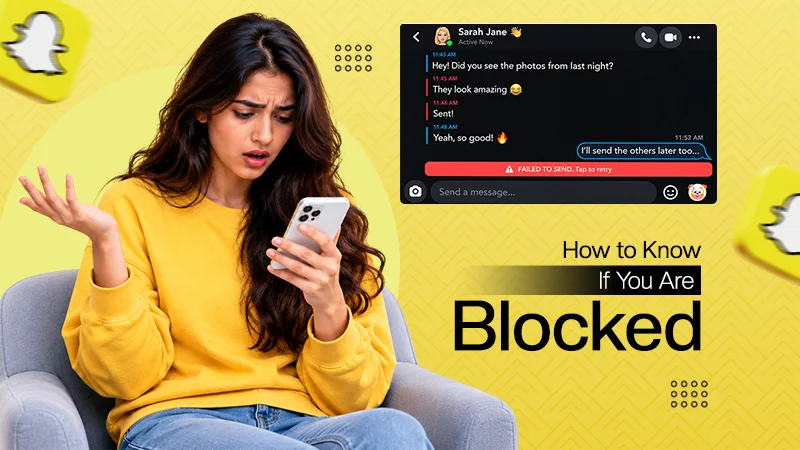
What Happens When Someone Blocks You on Instagram
If you are curious to know what happened when someone block you on Instagram, the same process repeats for you too. Instagram will not send you any notification when someone blocks you. You will not be able to see their profile in search results, see their posts, or even message them.
Here are some important signs you need to notice if someone blocked you;
- You will not get anything in search results with their username.
- You will see on their profile “User not found” or “No posts yet” but a friend can see everything as usual.
- They will disappear from your following list.
- New messages will not show “Seen”.
- Their profile photo goes away and only name appears as “Instagram User” in your old chat.
Note: Even a deactivated Instagram account will also show similar results. If another mutual friend also gets the same results, the person is more likely to have either deleted or deactivated their account rather than blocking you.
Do you want to know how to tell if someone blocked you on Instagram?
What Happens to DMs, Group Chats, Likes, and Comments?
Blocking someone on Instagram stops a new connection. However, it will not delete your chat history. This is where you will find most guides confusing but worry not! Here you will have clear and correct details of group chats, comments, likes, and DMs after blocking.
| Item | What Happens After a Block |
| New messages | Can’t be delivered from either side. |
| Shared group chat | It is your choice whether you wish to leave or stay. |
| Old DM history | Will be available in your inbox. |
| New tags and mentions | Will stop working |
| Messages sent while blocked | Won’t be delivered, even when you unblock. |
- Messages: The chat history will be available in your inbox, but neither of you can send or receive new messages. If you want to erase it, do it yourself.
- Facebook: If you have not linked your Facebook account in the Accounts Center, the user can call or send you messages there. So, block them on Facebook too.
- Likes and comments: When you block someone on Insta, their likes and comments on your posts will be removed. These will not reverse even if you unblock them in the future.
- Group chats: Instagram will give you two options, either to be in the common group or leave it. It is totally up to you if you want to cut off fully just leave or can stay in the group.
How to Block Someone on Instagram
There are two ways to block someone on Instagram: One is from a chat, and another is from their profile. These steps are alike on both iPhone and Android phones; block becomes effective instantly.
How to Block Someone on Instagram from Profile?
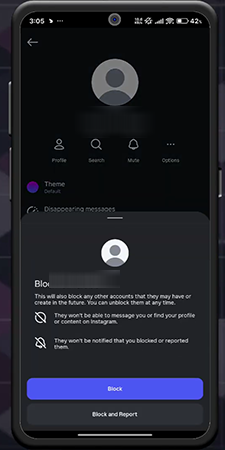
Follow the steps below to block a user from its profile;
1) Go to the user’s profile on Instagram.
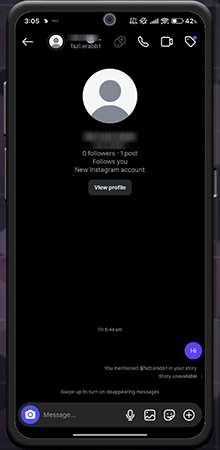
2) Click the three dots menu from the top right corner.
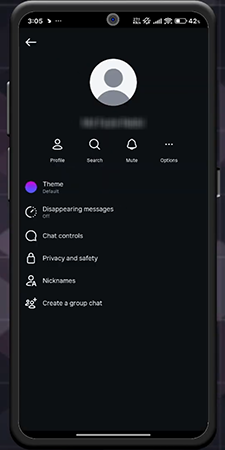
3) Choose “Block”.
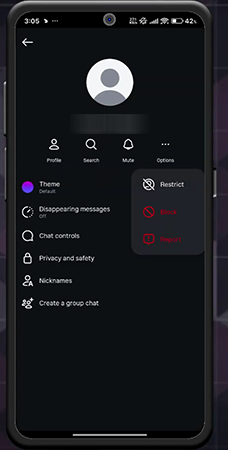
4) Click Block once again for confirmation.
How to Block Someone on Instagram from Direct Message
If you are chatting with the user and want to block him, follow these steps for even faster results;
1) Go to your DMs on Instagram.
2) Open the user’s chat.
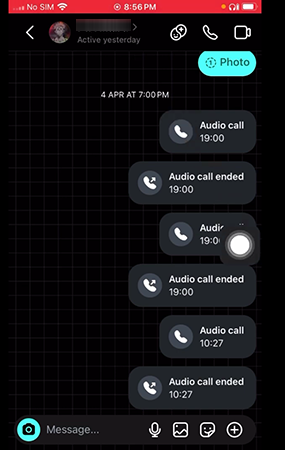
3) Click the three dots on the user’s name from the chat top and choose Block.
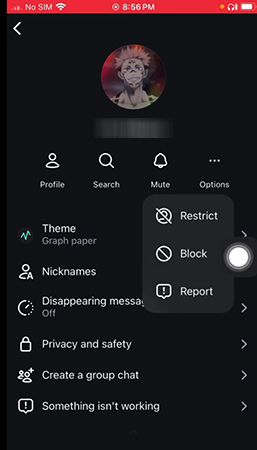
4) Click Block and confirm.
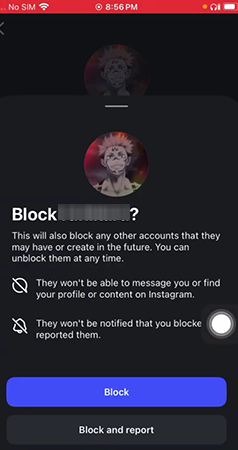
Note: Instagram does not block all the accounts of a user you are following, you will have to block individual accounts separately or choose all the existing or new accounts this person may create.
What Happens When You Unblock Someone?
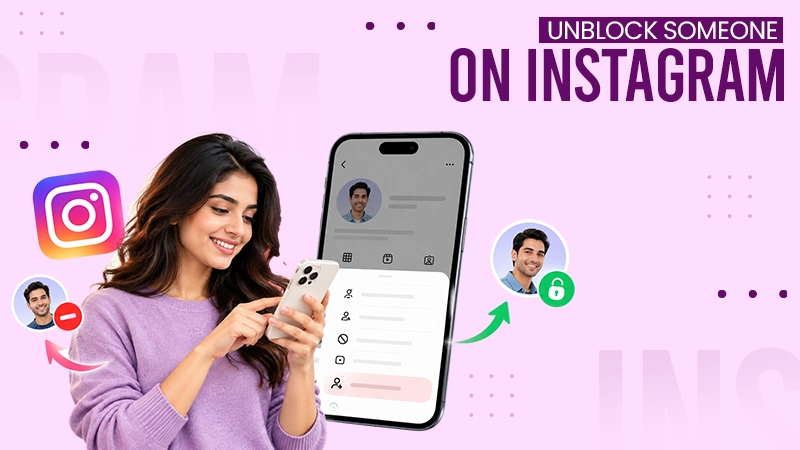
When you unblock a user on Instagram, they can find your profile, send you messages, and see your posts and stories once again. Users do not get any notification from Instagram for blocking and unblocking.
Here are a few things that do not reverse with unblocking;
- You cannot follow each other again automatically.
- In case their comments and likes are removed, these won’t show up.
- Messages sent during the blocking period will never be delivered.
Note: In order to unblock someone on Instagram, open Settings → Blocked → click Unblock beside the user’s name and Confirm the pop-up.
Which One Fits You: Mute, Block, or Restrict?
If you feel blocking is harsh, worry not! Instagram also has two different options Mute and Restrict. If you Mute someone, it will hide their content from your feed. But Restrict sets limits on someone quietly. None of these features alert the user, so you can choose anyone that fulfils your needs.
| Factor | Block | Restrict | Mute |
| Can they see your posts? | No | Yes | Yes |
| Their new comments | Not possible | Visible only to them | Not affected |
| They get notified | No | No | No |
| Their messages | Blocked | Go to message requests | Muted if you choose |
| You stay connected | No | Yes | Yes |
| Best for | Ending all contact | Awkward commenters you know | A break from someone’s posts |
Suggestion: Use restrict for a friend, relative, or a colleague whom you cannot cut the connection completely. Apply Block for scam, harassment, or spam accounts.
Dos and Don’ts of Blocking Someone on Instagram
Keep these dos and don’ts in mind so that you know what happens when you block someone on Instagram.
Do’s:
- Save screenshots of harassing messages before you block the user as these are important to show evidence in the future.
- Make sure to check your following list just to block their other accounts too if you follow.
- Leave a shared group chat in case you do not want to continue any relation with the user.
- Report the user if he goes against Instagram’s rules because reports are kept anonymous.
Don’ts:
- Never block anyone just over a small argument because you can unblock the user but can’t get the following connection automatically.
- Do not just depend on Instagram blocking if your Facebook account is not linked in the Accounts Center.
- Do not believe that blocking will erase your chat history.
Conclusion
By now you must have known what happens when you block someone on Instagram. The user will not be able to see your profile, stories, posts, or send you messages. Instagram does not send them any notification for blocking. However, your old chats remain unaffected, your following connection ends and common group chats are open until you leave the group. For limited access go for Mute or Restrict not Block.
FAQs
Q1) Will Instagram send notifications when I block someone?
Q2) Is it possible for a blocked user to see my Instagram profile?
No, a blocked person can never see your Instagram profile, posts, or stories using his account. But he can see your comments and likes on the posts from a public account or the accounts you both follow.
Q3) Will messages disappear if I block someone on Instagram?
No, your Instagram messages do not delete from the chat when you block someone on Instagram. These will be available in both of your inboxes. But neither of you can start a new conversation. If you want to remove the messages, delete the whole chat yourself.
Q4) What happens when you blocked someone on Instagram who is in your group chat?
Instagram will ask you in this situation if you wish to leave or be a part of the group. If you want to be in the group, both will be able to see each other’s messages. Leaving the group will cut off all the connections.
Q5) Does the following connection restore when I unblock someone on Instagram?
No, you won’t automatically follow each other’s accounts. You need to follow accounts once again. Users will not get any messages while they are blocked. Moreover, Instagram does not send any notification about unblocking.
Q6) Which is a better option; restrict or block on Instagram?
Restrict can be a better option for someone you already know but want to set boundaries rather than blocking them. It will simply hide their comments and send their messages to your message requests. Block someone if you wish to end the connection forever. It is better for unwanted, spam, or harassment messages.
Sources:
What happens when you block someone on Instagram by Instagram Help Center
Restrict or unrestrict someone on Instagram by Instagram Help Center
Block or unblock someone on Instagram by Instagram Help Center
Related Post's