No, you will not get any notifications when someone blocks you on Snapchat. You can only notice this when you search the profile and it does not appear in the results, the chat is missing, or you can’t see Snaps.
Blog
How to Tell If Someone Blocked You on Snapchat: 5 Quick Signs To Confirm
Do you know how to tell if someone blocked you on Snapchat? You don’t get notifications when someone blocks you, but there are some signs that you can easily notice. Their chat disappears; you can’t get their profile in search results or send Snaps. Finally, check with a common friend to confirm it immediately.
Know these 5 signs to confirm blocking and the difference between a blocked, removed, or deleted account.
Quick Answer
How to tell if someone has blocked you on Snapchat?
You can easily know this if someone has blocked you on Snapchat just by observing whether you are able to see their profile and Snap Maps or not. If the person has blocked you, you can’t follow or send them messages again. Finally, ask a common friend to search using his exact username. If he can see his profile and you can’t, this is a strong sign.
Note: Do not assume based on just a single sign, as it can be due to a renamed, deleted, or blocked account.
Table of Contents:
5 Signs That Show Someone Blocked You on Snapchat
The strong signs of a block include a profile that does not appear in your search, a missing chat, and chats or snaps that will not be sent. Blocking removes all the direct connections between two users on Snapchat.
Here are some signs that can help you confirm if you are blocked:
1. Their Chat Vanishes From Your Chat Screen
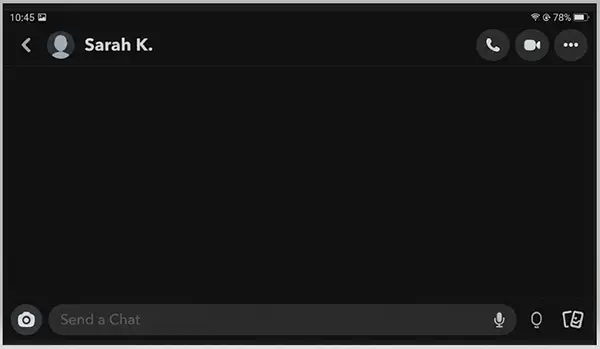
Your personal chat with the user disappears when they block you. Snapchat says that you will lose your chat, including saved messages with the person who is no longer your friend. It also covers blocking. If you occasionally chat with someone and their chat suddenly goes away from your screen, that is your first strong clue.
2. Their Profile Does Not Appear in Search Results
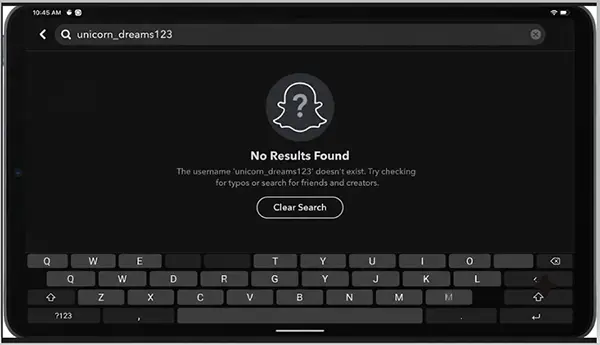
If someone has blocked you, you will not be able to get their profile in your search results. Blocked users are kept hidden from best friends, search results, and Quick Add. Make sure you use their exact username and not just display names. Because people can now change their username on Snapchat, if you are searching with an old name, it will not show any results.
3. You Won’t Be Able To Share Snaps or Chats
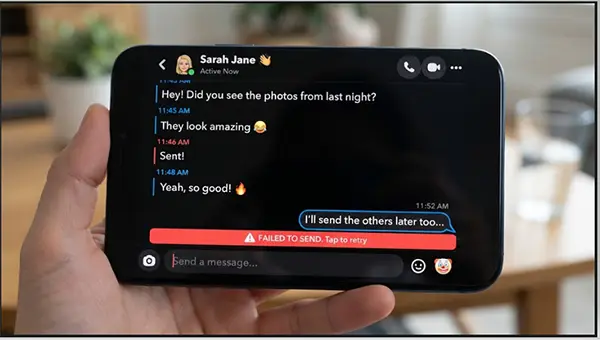
You will not be able to start chatting or send snaps to someone who just blocked you on Snapchat. If you try sending him messages through the old chat, your messages may either fail or not show as delivered. You should give it a try only once because sending a lot of messages will not change the result.
4. Their Stories and Snap Map Location Are Gone
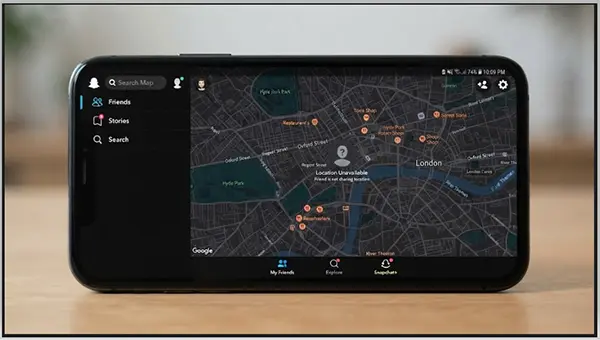
If you are blocked, you will not be able to access the person’s Snap Map location, Stories, and Charms. The location will also disappear even if they shared it with you earlier. In case the Bitmoji suddenly left from your map and their stories stopped showing at the same time, is a strong block hint.
5. You Get a “Couldn’t Find” Error
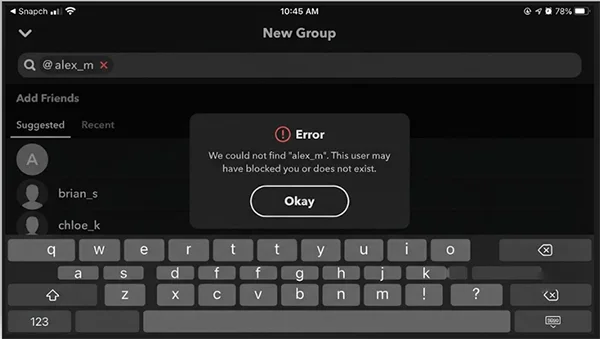
When you try to add them to a new group, you get an error saying, “We could not find [name].” It means you are likely blocked. But you also get the same error when an account is deleted. Thus, you can consider this a strong indicator but not final evidence.
Here is a quick summary of each sign:
| Sign | Points to a Block? |
| “Couldn’t find” error | Possible |
| Chat is missing | Likely |
| Not found in Search | Likely |
| Snaps won’t send | Very likely |
| Stories and map gone | Possible |
Also read: How to Tell if Someone Blocked You on Instagram: Easy Methods to Know the Signs Fast
How to Tell If Someone Blocked You on Snapchat
The best way to confirm if someone has blocked you on Snapchat is to compare what you and your common friend can see. If you are blocked by someone, you will not be able to see their account, but others can find it.
Here are the steps to check how to tell if someone you blocked on Snapchat
- Go to Snapchat and swipe right from the chat screen and search for the user’s name.
- Click the search icon from the top and write their exact full name.
- If you do not get any results, ask a common friend to search for the same username on his device.
- If your friend can see his profile in search results, but you cannot. There is a high chance that you are blocked.
- If neither of you can find his profile, it means the account is either deactivated, deleted, or renamed.
Suggestion: Some guides may suggest you create a new account just to confirm, but we never recommend it. You had better ask a common friend who will also give you the exact same result without crossing boundaries.
Difference Between Blocked, Removed, and Deleted Account
A block will hide the account for you only, whereas a removal keeps the account visible. But a deleted account will not be visible to anyone. These three options may sound the same, but they are slightly different. You must know the difference first before jumping to a conclusion.
| Factor | Blocked | Removed | Deleted |
| Can Chat or Snap you | No | Depends on settings | No |
| Mutual friend can find them | Yes | Yes | No |
| Private Stories visible | No | No | No |
| Shows in your Search | No | Yes | No |
| You can send a friend request | No | Yes | No |
Snapchat says if you remove someone, he will just disappear from your friends list but may still be able to chat or Snap you depending on your privacy settings.
Note: Snapchat, on deactivating and deleting, says that it will deactivate the account for 30 days first. During this period no friends can contact the user and post 30 days after the process of deletion starts. But for India users, Snapchat says that the permanent deletion will take place after 180 days of deactivation.
What Still Works After Someone Blocks You
Blocking does not delete everything. Here are a few things that will still be available, which most guides will skip. If you know them, you might ignore the misleading conclusions.
- Saved messages may disappear: Snapchat says that saved messages may be removed when two users are not friends anymore, which also includes blocking.
- Public posts may be visible: On Snapchat, you will still be able to see Spotlight Posts and Public Stories of the users who blocked you. When you watch their Spotlight video, do not believe that they have unblocked you.
- Common group chats are active: Blocking will not remove either of you from a common group chat. You can see each other’s messages, but neither of you can share messages personally or add another one to new groups.
Example: You will not be able to find your friend in search results. But you can see their messages in your class group. This is how blocking actually works on Snapchat.
What to Do If Someone Blocked You on Snapchat
The best option is to respect the person’s decision and give him some time and personal space. There are multiple reasons why people block, including stress, privacy, or a break. You must go through these simple steps before reacting.
- Double-check all the signs, keeping the common friend confirmation at the top.
- Reconnect with them through another platform only when you know them very well, and it looks appropriate depending on the situation.
- Take help from a common friend if you think that it could be by mistake. Because Snapchat allows its users to check their blocked accounts and unblock them too.
Conclusion
Now you have understood how to tell if someone blocked you on Snapchat. Check it by not getting his profile in search results, a missing chat, and snaps that do not deliver. Finally, ask a common friend. If he also gets the same results, the account is either deactivated or deleted. However, you must respect the person’s decision regardless of the result.
FAQs
Do you get notifications when someone blocks you on Snapchat?
Is it possible to see someone’s profile who blocked you on Snapchat?
No, you do not have access to see their Snap Score, Stories, or profile if they have blocked you on Snapchat. You no longer get their account in the search results. But you will be able to see their Spotlight posts or public stories.
How can I confirm if someone has either deleted their Snapchat account or blocked me?
You can ask your common friend to search for their Snapchat username. If their account shows up for your friend and not for you, you are likely to be blocked. But if neither you nor your friend can see their profile, the account seems to be deleted or deactivated.
Will I see someone’s messages in a common group chat even if they have blocked me?
Yes, blocking removes neither of you from a common group chat. You will see all the messages there, including the user who blocked you. But you can’t send messages separately or add each other to new groups.
Do we once again become friends automatically if someone unblocks me?
No, unblocking does not restore your friendship. Either of you will have to send a new friend request once again. According to Snapchat, you may not be able to get your old chat history, including saved messages, even after unblocking.
Sources:
How do I block a friend on Snapchat? by Snapchat Support
How do I deactivate or delete my Snapchat account? by Snapchat Support
How to Tell if Someone Blocked You on Snapchat by Tomsguide
Related Post's