No, users do not get any notification from Instagram when you unblock them. They come to know only when they search your profile, and it appears for them again if you once again refollow them.
Blog
How to Unblock Someone on Instagram: Two Easy Ways in 2026
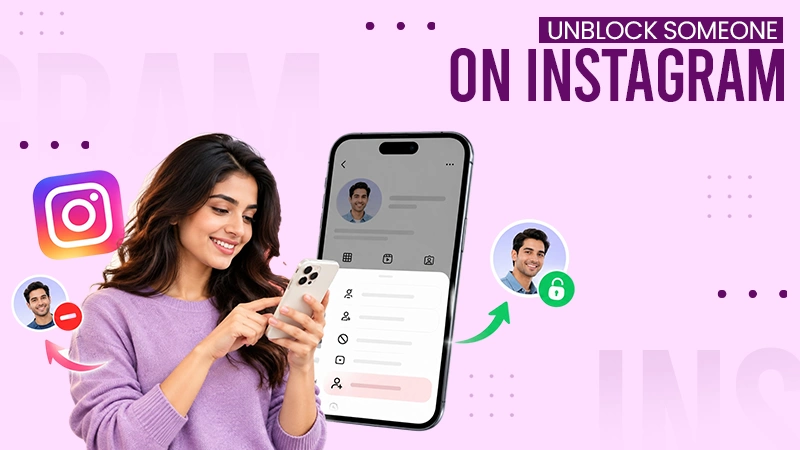
If you want to unblock someone on Instagram, you can do it in under a minute. Open Settings and scroll down to Blocked. Click Unblock for the account you want to unblock.
Here you will learn how to unblock someone on Instagram on the mobile app and desktop browser, quick solutions, how to get someone to unblock you on Instagram, and the difference between restrict, mute, and block.
Quick Answer
How to unblock someone on Instagram?
To unblock someone on Instagram, you need to open Settings and tap “Blocked” to see the blocked list. Now click “Unblock” for the account you want to remove from this list. Finally hit the unblocked when the pop-up shows up for the confirmation.
Table of Contents:
How to Unblock Someone on Instagram?
Instagram allows you to unblock someone with a mobile app and a desktop browser. Go to “Blocked” under “Who can see my content” in the settings and click “Unblock” for the user. This is a better approach because it works even when someone has changed their username. Instagram does not send notifications when you block or unblock someone.
Below are the steps to unblock using the mobile app and a desktop browser.
How to Unblock Someone on Instagram on Their Phone?
Here is how to unblock someone on Instagram using the mobile app:
1) Go to the Instagram app and tap your profile icon in the bottom right corner.
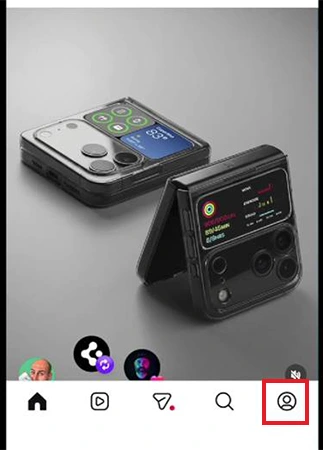
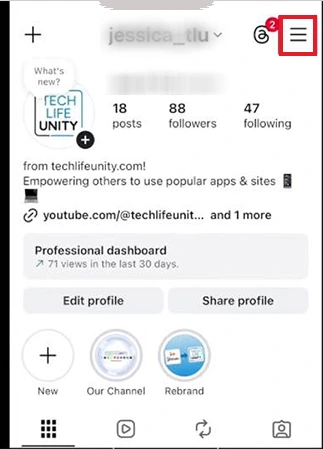
2) Click the three-line menu in the top right corner.
3) Scroll down to Blocked under Who can see my content.
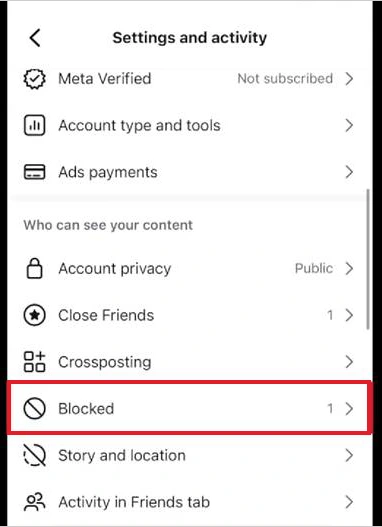
4) Click Unblock for the account you want to remove from this list.
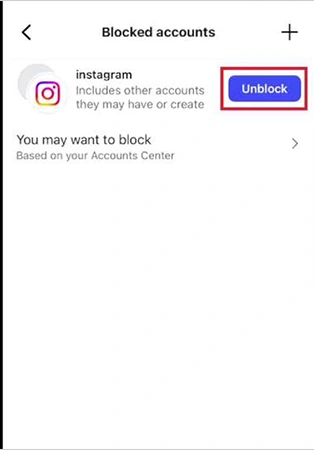
5) Tap Unblock from the pop-up.
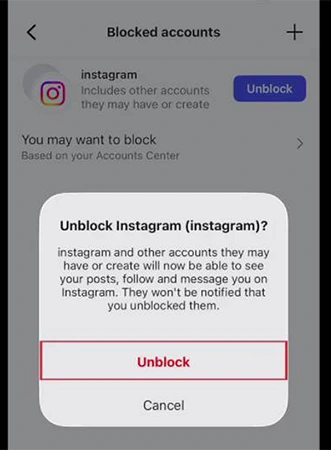
Note: If you have someone with other accounts that they may have created, the rest of the accounts remain blocked until you unblock them separately, one by one from the same list.
How to Unblock Someone on Instagram on Desktop
Here is how to unblock someone using a web browser:
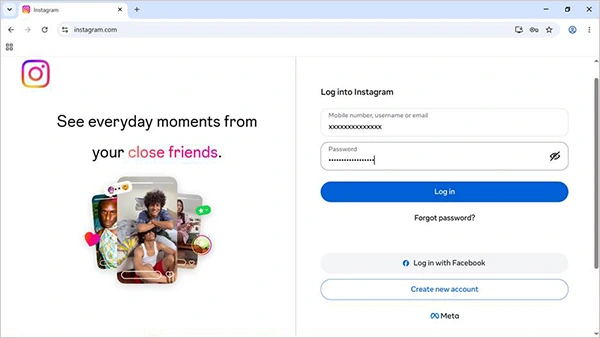
1) Open a browser, go to https://www.instagram.com, and log in.
2) Click (☰) More from the bottom of the left sidebar.
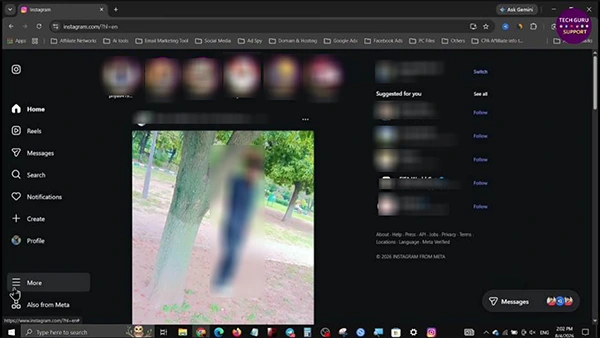
3) Tap Settings.
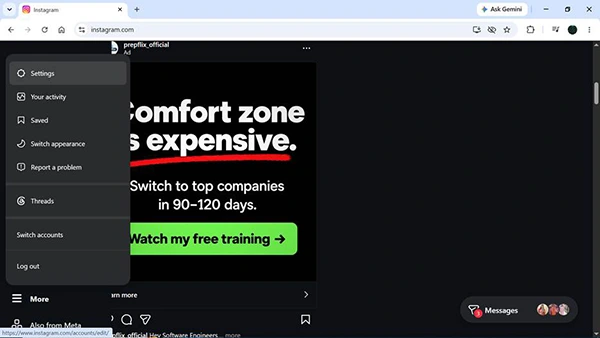
4) Click Blocked under “Who can see your content”.
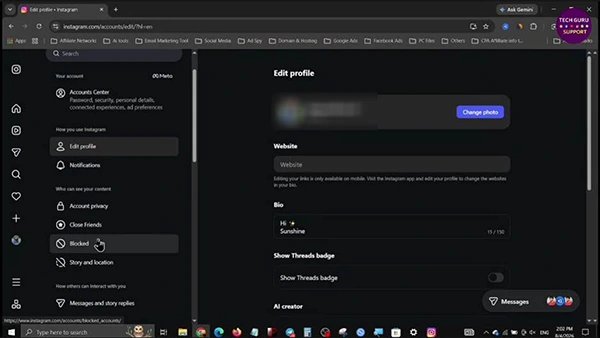
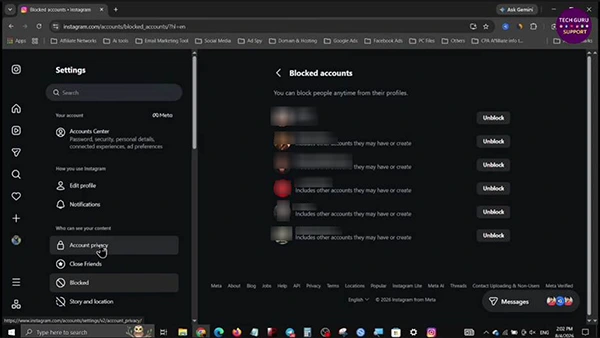
5) Tap Unblock for the account you want to unblock.
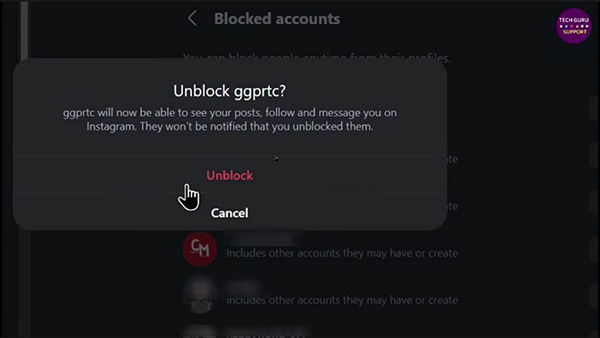
6) Click Unblock to confirm.
Real example: Once I blocked my old classmate in 2022, but when I tried searching for his name to unblock him in 2026. I could not find his profile in the search results, as he changed his username. However, I easily found his account in the blocked list and removed his account from there.
What Changes When You Unblock Someone on Instagram
If you unblock someone on Instagram, it will be removed immediately. However, your earlier connection is not automatically restored, as Instagram considers it a new beginning.
Here is what changes when you unblock someone on Instagram:
- They will not get any notification when you unblock them, just as they did not receive one when you blocked them.
- They can comment, tag, and message you once again depending on your privacy settings.
- They can see your profile, stories, and posts again in search results if your account is public.
- You do not follow each other automatically like before. Thus, you need to send the follow-up request again.
- When you unlock someone on Instagram, it will not affect anything on Threads or Facebook. Because blocking is distinct on each app.
- Their old comments and likes remain as usual on your posts. Instagram does not remove them when you block, so nothing changes about likes and comments even when you unblock.
Which One Suits You: Mute, Restrict, or Block
If you want to unblock someone but keep some distance, then mute or restrict can be the best alternative options instead of directly blocking. Every tool sets a different limit of contact, and none of these will send any notification to users.
Below is the table of some options with their features just to help you make the right decision.
| Feature | Blocked | Restricted | Muted |
| Best for | Harassment or safety | Unknown contacts | Too many posts |
| Can message you | No | Goes to requests | Yes |
| Can see your profile | No | Yes | Yes |
| Their comments | Not possible | Hidden till approved | Visible |
| They get notified | No | No | No |
Advice: In my opinion, Restrict is a better approach. You can unblock any user but restrict them for some time just to observe their behavior before trusting them completely.
How to Get Someone to Unblock You on Instagram?
It is not possible for you to unblock yourself on Instagram. A lot of people also search on Google for how to unblock yourself on Instagram. But the honest answer is that only the person who blocked you has the right to unblock you. However, you still have one last option to ask them politely, but respect their final decision in case it is still no.
Here are some genuine tips that will give you the best opportunity to reconnect:
- Reach out at least once: Use a different platform or channel, like WhatsApp, email, or Facebook, or through a common friend.
- Give them some time: If you pressure them to unblock you, it will keep the period even longer; thus, never try this.
- Say sorry politely: If you have done something wrong, acknowledge your fault and apologize for it without giving any explanation.
- Respect their decision: The person may have blocked you just to secure his privacy, peace, or personal life. You should respect their decision, as it is their right.
Here is a simple and real message that may work perfectly.
For example, “Hello, I know that you are angry with me. I am really sorry for what I did. If you ever feel like talking, I am always available. No pressure, I truly respect your decision and feelings.”
This is a real, short, and honest message that gives them an option.
Note: Do not try connecting with them using fake accounts. Because users can block as many people as they want on Instagram and get your account reported for harassment.
Why Can’t I Unblock Someone on Instagram?
Most unblocking problems that users face take place due to an outdated application, a deleted account, or a changed username.
Here are some quick solutions that you can apply to avoid them.
- Account does not show up in the blocked list: This occurs when the account is either deleted or deactivated. You should check the list after some time.
- Profile does not appear in search results: The user may have changed their username. To confirm this, go to Settings and activity – Blocked.
- Still can’t see their posts: It happens when their account privacy is private, or they too have blocked you.
- Unblock option does not work: Try updating the app, restarting your device, or checking on Instagram.com using a browser.
Dos and Don’ts Before Unblocking Someone
Keep these dos and don’ts in mind when you unblock someone on Instagram.
Dos:
- Go through your privacy settings before you unblock someone just to know who sees your posts.
- If you have blocked multiple accounts, unblock the linked accounts one by one.
- Reconfirm why you blocked someone and whether the reason still persists.
- Apply “Restrict” at the beginning when you do not know much about the person.
Don’ts:
- Do not hope that your previous chat or follow connection will be back automatically.
- Never unblock a user who has ever threatened or harassed you just for checking on them.
- Do not repeatedly block and unblock someone, as it may sound like playing a mind game.
Conclusion
Now you know how to unblock someone on Instagram just by following simple steps: go to Settings and activity → Blocked, and then click any username to Unblock. He will get no notification for it. Moreover, both lose the follow connection.
If someone has blocked you, you can’t unblock yourself. Instead, you can politely ask and accept their final decision. Review your Instagram blocked users list today.
FAQs
Do users get any notification when you unblock them?
If I unblock someone on Instagram, will it make them follow me back?
No, because blocking removes following connections, and unblocking can’t undo it automatically. Both users have to send follow requests again. In case either of your accounts is private, the person has to approve the request so that another one can see his posts.
How can I check all the users I have blocked on Instagram?
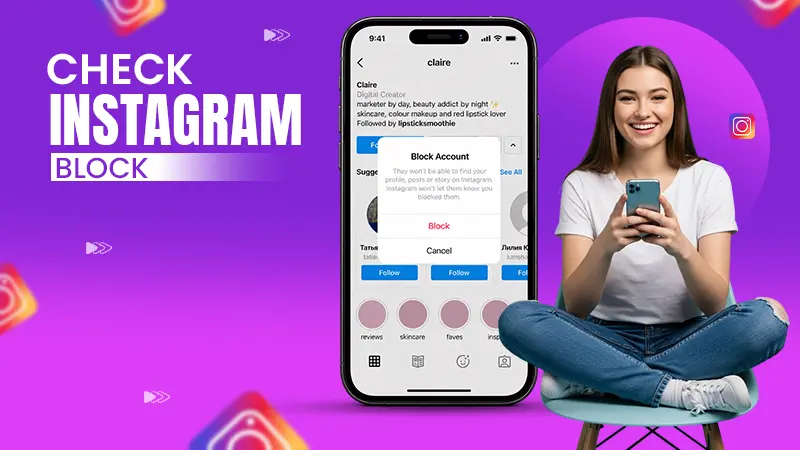
Click your profile picture → tap the three lines (☰) menu → Settings and activity. Scroll down to “Who can see your content” and click “Blocked”. Here you will see a list of all blocked accounts.
Why am I unable to find a blocked person in an Instagram search?
Because blocked profiles will not show up in search results, and the user may also have updated their username or deactivated their account. It is better to check your blocked list, where you can even unblock them without searching their profiles.
Is it possible to unblock myself if any user blocked me?
No, you can’t unblock yourself if someone has blocked you on both Instagram and Facebook. Only the user who blocked you has the right to do it. All you can do is ask them politely using a mutual friend, text, or another channel.
Sources:
Block or unblock someone on Instagram by Instagram Help Center
See who you’ve blocked on Instagram and unblock them by Instagram Help Center
Updates to How We Protect People on Instagram From Abuse by Instagram Help Center
Related Post's