The size of a Facebook event cover photo is 1920 x 1005 pixels with a 1.91:1 aspect ratio.
Blog
Facebook Event Cover Photo Size: Best Dimensions for 2026
The current Facebook event cover photo size is 1920 x 1005 pixels. Its aspect ratio is around 1.91:1. If you use a different size for your event poster, it can miss important details, hide response buttons, or look blurry. Know the correct Facebook event cover photo dimensions, safe places to use, and steps to add or change one.
Quick Answer
What is the best Facebook event cover photo size?
The Facebook event cover photo size is 1920 x 1005 px. You should always use it to create any template for a cover photo on Facebook. However, it is not an official recommendation from Meta but based on real results.
Aspect ratio: Approximately 1.91:1
Minimum size: Facebook accepts at least 400 x 150 pixels.
Formats: JPG is best for photos, while PNG is best for logos and text.
Old size: 1920 x 1080 px (16:9)
Table of Contents:
- What is the Facebook Event Cover Photo Size?
- Why the Facebook Event Cover Size Changed
- Facebook Event Cover Photo Dimensions by Placement
- Best Place to Add Text and Logos
- Facebook Event Cover Size vs Other Facebook Image Sizes
- How to Add or Change a Facebook Event Cover Photo
- How to Finalise Your Facebook Event Photo Before You Post?
- Common Mistakes of Facebook Event Banner Size
- Do’s and Don’ts of Creating a Facebook Event Cover Photo
- Conclusion
- FAQs
What is the Facebook Event Cover Photo Size?
Currently, the perfect size of a Facebook event cover photo is 1920 x 1005. This size has become the informal standard, though it isn’t officially recommended by Meta. Earlier, this size was 1920×1080 pixels. It converts into an aspect ratio of 1.91:1. Meta uses the same frame for feed link previews and creative ads; therefore, it fits so well in various views.
The most important thing that many guides ignore is that Meta has not recommended any specific pixels officially for Facebook event photo size. On Meta Help Centre, it says a minimum of 400 x 150 pixels will work fine. Keep in mind that this is only a minimum size and not a recommended one.
| Specification | Value |
| Accepted formats | JPG and PNG |
| Aspect ratio | Approximately 1.91:1 |
| Best for text or logos | PNG |
| Minimum accepted | 400 x 150 pixels |
| Previous standard | 1920 x 1080 pixels (16:9) |
| Recommended size | 1920 x 1005 pixels |
The most commonly used size is 1920 x 1005. It is not an official recommendation but depends on real-world results and industry testing. This size fits perfectly in most layouts on Facebook.
Why the Facebook Event Cover Size Changed
Facebook has updated its photo size from 1920 x 1080 pixels to 1920 x 1005 pixels. The 16:9 ratio was taller than the header space Facebook shows on a phone. Earlier, the platform used to crop its size from both the bottom and the top, which would remove the event name or the date. An event photo with 1920 x 1005 pixels fits perfectly in a 1.91:1 frame. Facebook uses this cover photo in multiple views; the design may look slightly different across placements.
The practical results are more important than the history. If your team saved a cover template for future use, it likely has the wrong size now. If your FB event cover dimensions are still 1920 x 1080 pixels in a template or in a Canva file, Facebook will trim the event photos this file creates.
Facebook Event Cover Photo Dimensions by Placement
The Facebook event cover photo does not remain the same in every corner. Facebook shows the same photo in multiple places and crops it differently. However, a 1920 x 1005 photo size fits perfectly in all views. It is better to design it in one perfect version rather than working on different sizes.
| Placement | How the image appears |
| Event page | Full banner at close to full width |
| News feed | Very near the event page size |
| Shared post preview | Cropped at the sides on small screens |
| Upcoming Events list | Small thumbnail, toward the center cropping. |
The thumbnail view becomes the center where most issues occur. A post that has text on the right and a logo on the left side looks wonderful on an event page. But a thumbnail shows only the main center view on the image. This center cropping may remove the text and logo.
Best Place to Add Text and Logos
The perfect Facebook event header size place is the upper two-thirds of the photo. It works the same on a mobile screen and a desktop browser. At the top is perfect for the date, title, and location, while the bottom is for RSVP buttons. This is why if you add anything to these places, it will create problems.
Follow these rules for perfect placement while editing the cover layout.
- Write the name of an event in the top half of the interface.
- Add logos in the center facing horizontally, as side edges get cropped on small screens.
- Don’t use all side corners for any visuals; leave them empty.
- Ignore fine print, as it is not perfect for compression at thumbnail size.
- Use a font size lower than 40 pixels before you finally publish it.
Facebook Event Cover Size vs Other Facebook Image Sizes
The size of a Facebook event cover photo is different from a page cover, profile photo, and group cover. If you use them incorrectly, you might face cropping issues with your event cover. Make sure to check the table below when you are creating a Facebook cover photo template for any campaign.
| Asset | Recommended size |
| Event cover photo | 1920 x 1005 pixels |
| Feed link preview | 1200 x 630 pixels |
| Group cover photo | 1640 x 856 pixels |
| Page cover photo | 820 x 312 pixels on desktop |
| Profile picture | 360 x 360 pixels |
How to Add or Change a Facebook Event Cover Photo
Only a host has access to change the main Facebook event cover photo. Therefore, if you are a host, you can add or change it. Guests and co-hosts cannot see this option to change or add the cover photo.
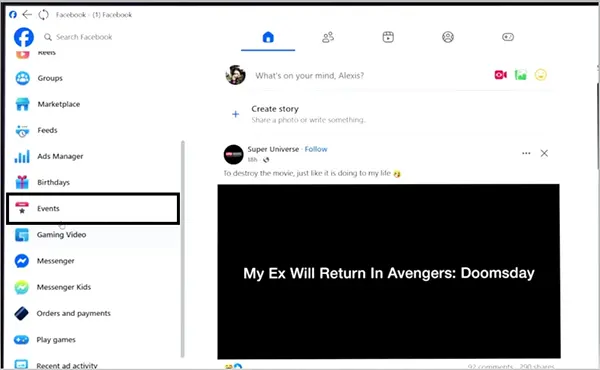
- On Facebook, go to Events.
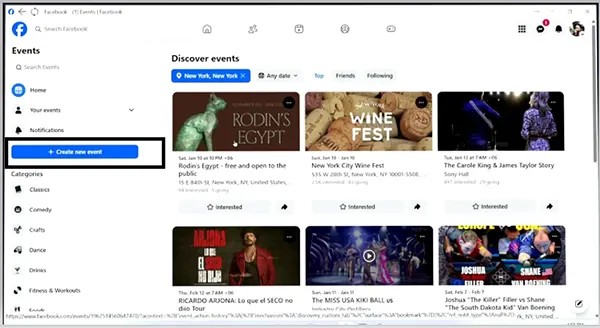
- Choose Create new event.
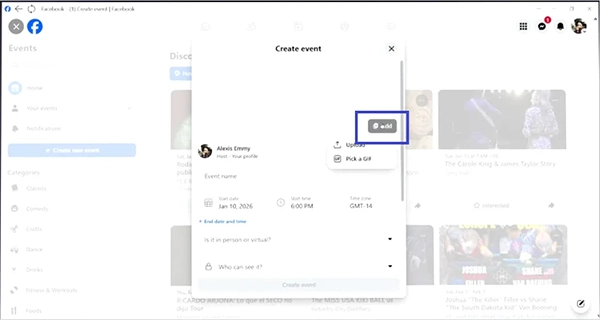
- Click Add to upload a photo or a GIF.
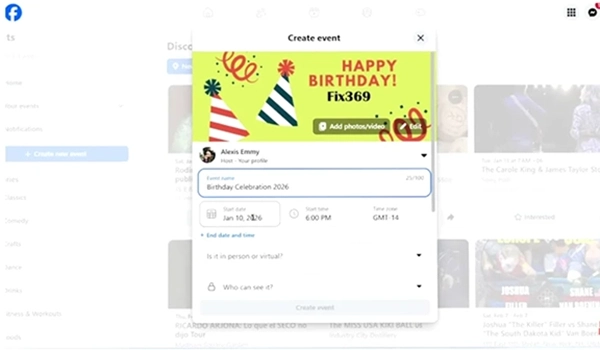
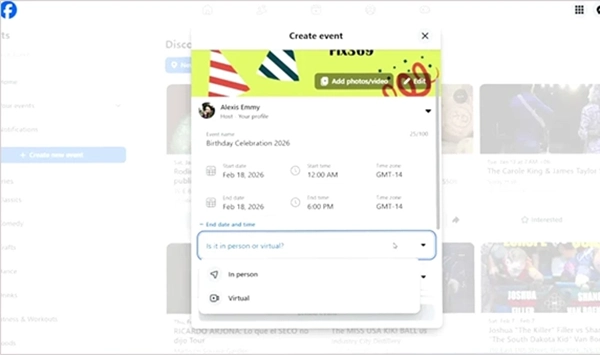
- Type the event name, date, and time.
- Mention whether the event is in person or virtual.
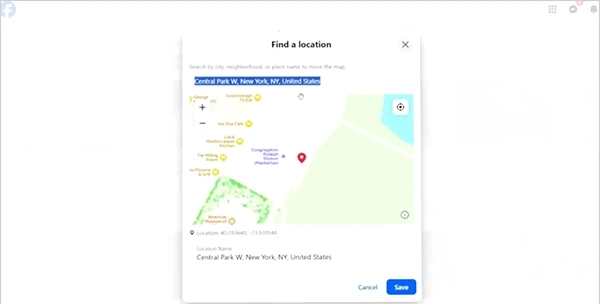
- Add a specific location if it is an in-person event.
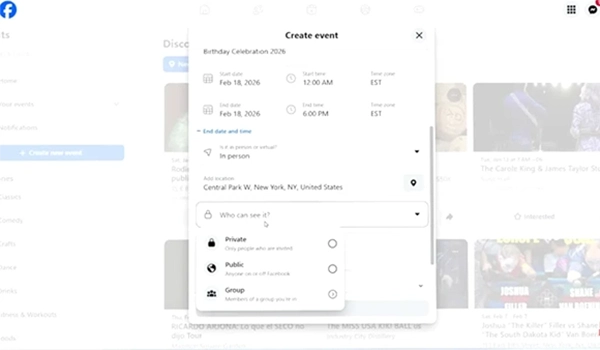
- Add the type of audience
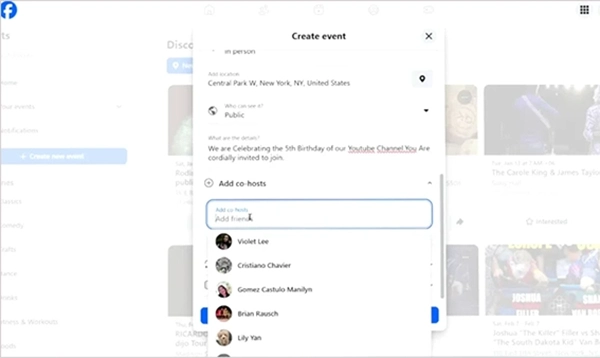
- Add co-hosts for the event.
- You can mention the occurrence for the same event.
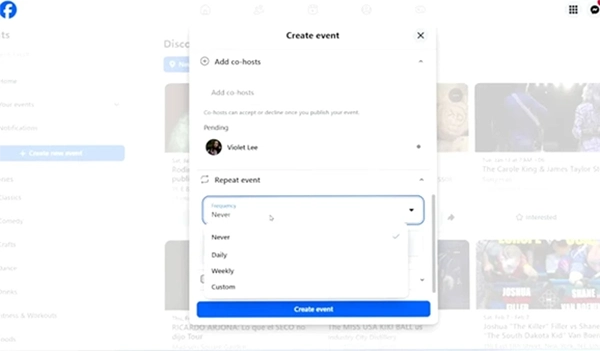
- Choose “Additional Settings” accordingly.
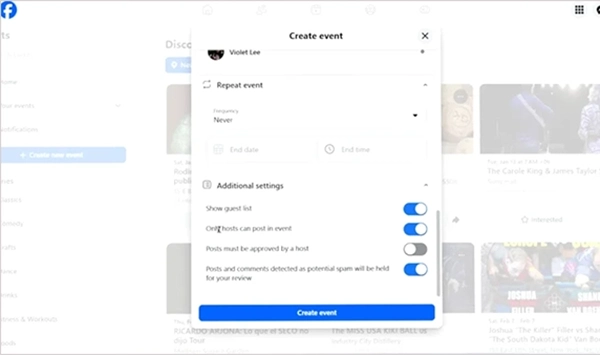
- After checking all the information once, hit the “Create event” button.
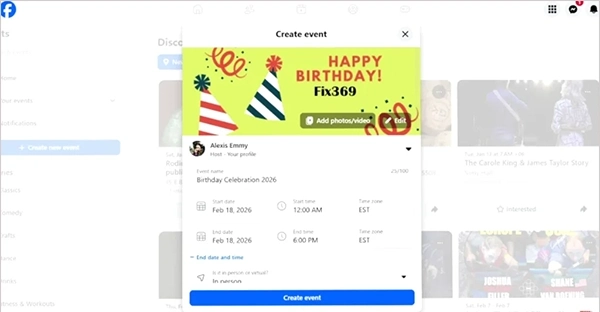
If you want to change the current cover photo in the future, follow the same steps. Go to events, click on an existing cover, and select “Change Cover Photo” this time instead of “Add Cover Photo.”
How to Finalise Your Facebook Event Photo Before You Post?
You must give it a check to find the most common issues before inviting anyone. Firstly, publish the event as private so that you can preview it yourself. Now, with the help of the list below, make sure everything is perfect before publishing it to the public.
- Open the event image on a phone and make sure you can see the title clearly.
- Check the same event poster on a desktop browser to compare both crops.
- Test the upcoming events strip to track the center-cropped thumbnail.
- Send the poster to your feed and check its width in preview mode.
- Zoom it up to 25% to check pixels. If you still read the headline on zoom-in view, it is perfect for a thumbnail.
Common Mistakes of Facebook Event Banner Size
Most of the event banners don’t bring the expected results. It is not just because of a lack of design skills. The main reason is using either an incorrect Facebook event photo cover size or export settings.
- If you are still using 1920 x 1080 pixel cover photos.
- Posting a photo taken by phone or a screenshot lower than 1920 pixels. It loses quality when Facebook stretches it to fit on displays.
- Sharing too much information in text or a full agenda. Users hardly read the main heading in a poster.
- Adding data on events at the end. The RSVP (Please Respond) buttons may hide this.
- Using a cover photo in CMYK (cyan, magenta, yellow, and key black) colors. But Facebook and Instagram use RGB (red, green, and blue) colors. Therefore, it affects color quality.
- Overlooking center cropping that loses logos if added near the corners.
Do’s and Don’ts of Creating a Facebook Event Cover Photo
Keep these do’s and don’ts in mind while creating an event cover photo.
- Always create a cover photo at 1920 x 1005 pixels.
- Better to use a PNG format if your cover photo has a logo or text.
- Make sure to keep your headline within 6 words.
- Preview the cover photo on a mobile screen before inviting users.
- Always use the same visuals for upcoming events in order to have recognition.
- Keep the template locked so that no one in the team has to guess it.
Don’ts
- Never upload any cover photo lower than 1920 pixels.
- Do not add text within the first 100 pixels of any corner.
- Don’t use Facebook’s built-in illustrations if your event is paid or professional.
- Don’t use last year’s dimensions; they change.
Conclusion
Draw your box 1920 x 1005 pixels. Place important text and images in the top two-thirds. PNGs are required for text. Always preview a Facebook event cover photo size on mobile. The size limit is the last thing you need to worry about. Your event covers get ignored because they have too much info, not because these were 75 pixels too big.
Next Step: Now go to your design tool to create a wonderful Facebook template of 1920 x 1005 pixels and set it as the default cover photo for all the upcoming events.
FAQs
Q1) What is the size of a Facebook event cover photo?
Q2) Is 1920 x 1080 acceptable?
Yes, you can use a cover photo with 1920 x 1080. But it will be cropped according to a mobile display.
Q3) What is the minimum photo size that Facebook allows?
People can use a minimum cover photo size of 400 x 150, but it will look blurry on the latest-generation displays.
Q4) Which is better, JPG or PNG?
Text and logos should be PNG. JPGs are good for high-quality 90-95% photographs.
Q5) Can I use a video as an event cover?
No, event covers must be images. You had better put your video in the discussion.
Sources:
Add a cover photo to your Facebook event by Facebook Help Center
Add or change your Facebook Page’s cover photo by Facebook Help Center
Facebook Page profile picture and cover photo dimensions by Facebook Help Center
Related Post's