No, Meta changed its name from quiet mode to sleep mode in January 2025. You can get this feature in the time management section under settings. However, it works the same as earlier, but only the name and location got changed.
Blog
Quiet Mode on Instagram: Know How to Turn It On and Off
Curious to know what Quiet Mode on Instagram means? Quiet Mode is a feature that pauses all your Insta notifications for a period of time you decide. Users will get an automatic message stating you are not available right now.
In this guide, you will know the Quiet Mode Instagram meaning, how to turn it on and off, and the difference between Sleep Mode and muting notifications.
Quick Answer:
Quiet Mode on Instagram is a feature to manage and control all notifications for a specific time duration.
- It changes your activity status to the Moon icon.
- It stops all alerts for likes, comments, and DMs.
- It also sends an automatic reply to users about your unavailability.
- Later, it shows a quick summary of what you missed during its activation.
- Since January 2025, it has been known as Sleep Mode.
Table of Contents:
- What Is Quiet Mode On Instagram?
- How to Turn On Quiet Mode on Instagram?
- How to Turn Off Quiet Mode on Instagram?
- Why Use Quiet Mode on Instagram
- What Happens When You Turn Quiet Mode On
- Difference Between Quiet Mode and Muting Notifications
- Is Quiet Mode on Instagram for Everyone?
- Common Problems With Quiet Mode
- Do's and Don'ts of Turning Quiet Mode On
- Conclusion
- FAQs
What Is Quiet Mode On Instagram?
Quiet Mode on Instagram is a special feature that controls notifications. It was launched by Meta on January 19, 2023, to help users take breaks without uninstalling the app. Meta changed its name from Quiet Mode to Sleep Mode officially in January 2025. However, this Sleep Mode feature also works the same as Quiet Mode.
Since most people even today search with the old name, you will find Quiet Mode and Sleep Mode both interchangeably in this article. This is the same feature with just a name update.
What does Quiet Mode mean on IG?
Quiet Mode on Instagram is a feature to control notifications. It helps users control their screen time and concentrate on other important tasks. You can schedule its duration as per your routine at any time.
How to Turn On Quiet Mode on Instagram?
To activate Quiet Mode on Instagram, you have to go to your profile icon first, then click Time Management and turn Sleep Mode on.
Here is how to turn on Quiet Mode on Instagram with quick and easy steps. Make sure to check that you are using the latest version of the Insta app.
1) Click your profile at the bottom right corner.
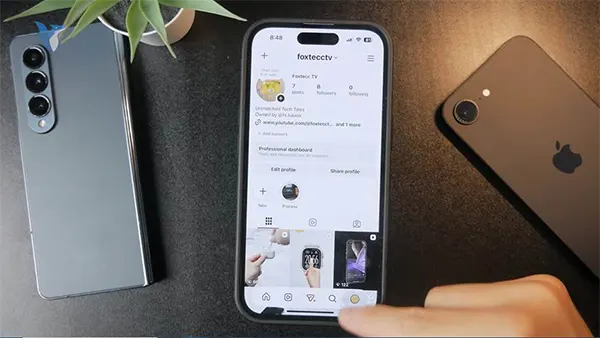
2) Click the three lines (☰) menu from the top right.
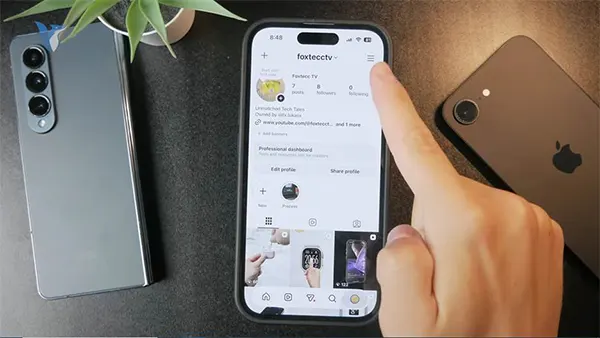
3) Click on the Notifications
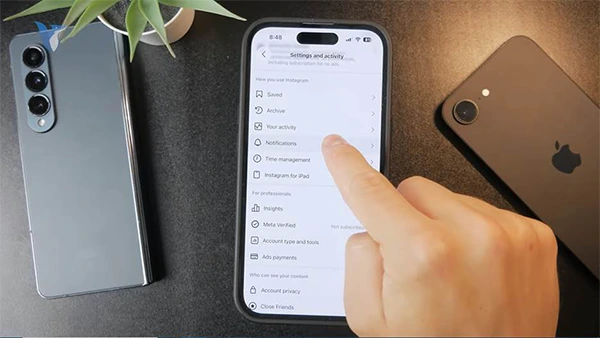
4) Tap Sleep Mode.
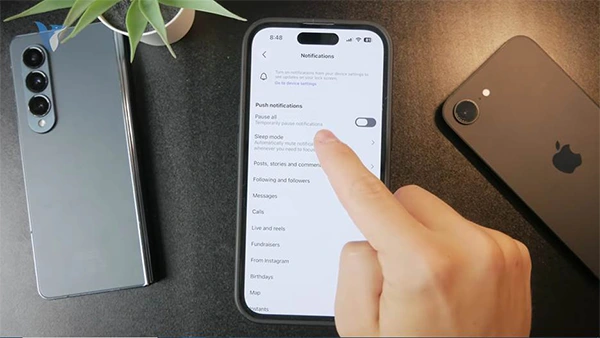
5) Turn on Quiet Mode Instagram.
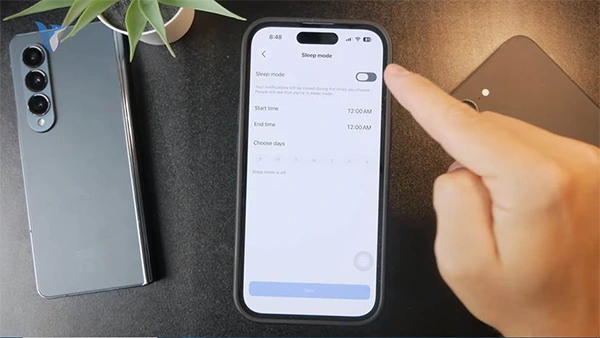
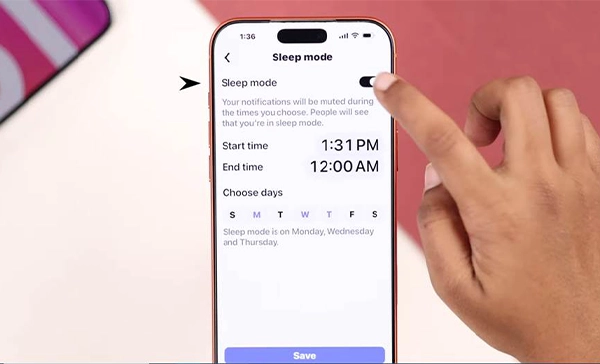
6) Click Save after scheduling the sleep mode time duration.
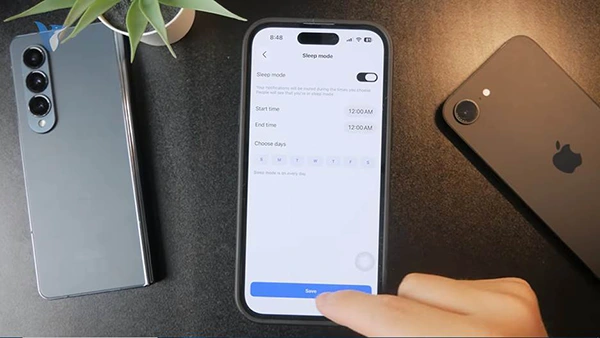
How to Turn Off Quiet Mode on Instagram?
If you want to turn off Quiet Mode on Instagram, you need to follow these steps. Here is how to turn off Quiet Mode on Instagram;
1) Click your profile icon at the bottom right corner.

2) Click this three-line menu sign.
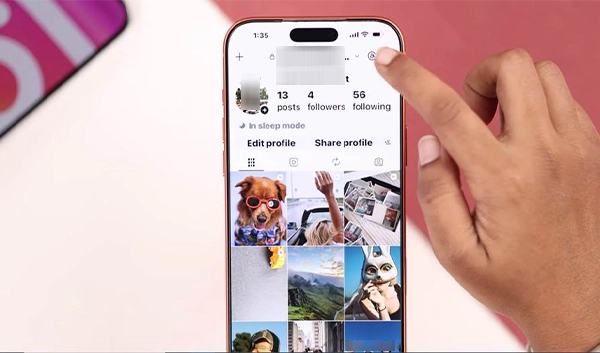
3) Tap Time Management.
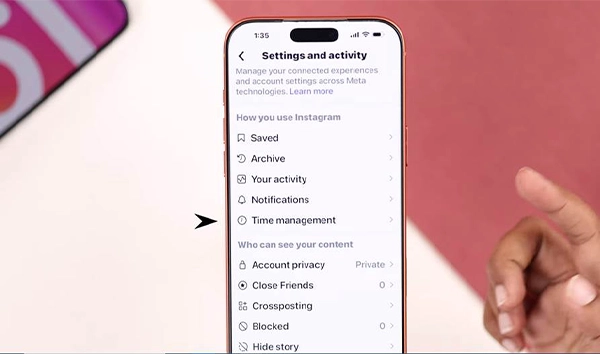
4) Click Sleep Mode.
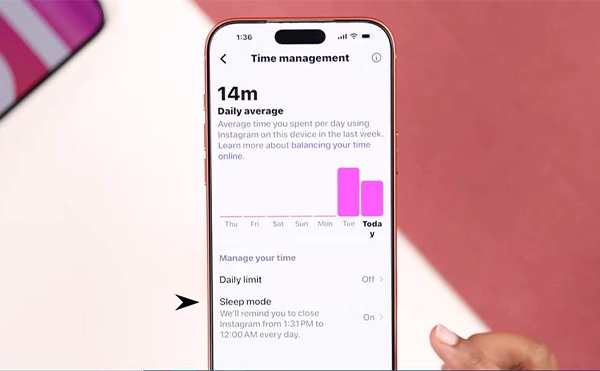
5) Turn Quiet Mode off.
Why Use Quiet Mode on Instagram
There can be a lot of reasons why users turn Quiet Mode on. Here are some of the common reasons:
- They want to sleep without being interrupted with a notification sound.
- To give more importance to family without cutting connections with followers.
- To control screen time and follow a healthy routine
- To concentrate on upskilling, studying, or working.
- To avoid distractions from alerts while in a meeting or driving.
According to Meta’s point of view, this special feature is rolled out to help users take breaks from the app whenever they wish. It is super helpful for teens and their parents not to worry about their children’s screen time.
What Happens When You Turn Quiet Mode On
There are three things that change when you activate Quiet Mode on your Insta account:
- Status changes: When you turn Sleep mode on, your profile has a moon icon. Moreover, Android users get a note saying that you are in sleep mode when they send you anything.
- Notifications pause: You will not get any notifications for comments, mentions, likes, and messages during sleep mode.
- Auto reply goes: If any follower sends you messages, they will get a reply automatically stating that you are not available right now and may not respond.
When the duration of Sleep mode ends, you will get a short summary from Instagram related to activities so that you do not miss anything really important.
Difference Between Quiet Mode and Muting Notifications
If you don’t know the difference between Muting Notifications and Sleep Mode on Instagram, check out the table below. You will know all the important points about both.
| Factor | Quiet Mode (Sleep Mode) | Muting Notifications |
| Auto-reply | Sends users automatic messages about who messages you | Does not send any reply |
| Best for | Scheduled breaks, like sleep, study, or work | Turning off alerts for an unlimited time |
| Schedule | Repeats daily at the times you set | Stays off until you switch it back on |
| Status change | Shows a moon icon on your profile and chats | No visible change to your profile |
| Summary after | Shows missed notifications once it ends | No summary is given |
Note: If you need a break for a fixed-time routine, use Sleep Mode. While you do not want to get interruptions from notifications, you can use Mute notifications, as it is an easy approach.
Is Quiet Mode on Instagram for Everyone?
Yes, Quiet Mode on Instagram is for every user. It sends out extra prompts, especially for teens, to help parents manage their children’s screen time. Instagram launched this feature for the very first time in the UK, US, Canada, Ireland, New Zealand, and Australia in 2023. This was later rolled out in other countries through a gradual rollout.
Adult users are free to schedule their Quiet mode timing as per their routines, as Meta does not prompt it automatically for them. However, Meta does prompt this for users with teen accounts to turn IG Quiet Mode on when it finds them using the app until late at night.
Common Problems With Quiet Mode
There are some common issues that some users face while turning on Quiet Mode on Instagram. Here are the possible solutions to common ones.
- Can’t see Sleep Mode: You should update your Insta app to the latest version, as older versions may still show it as Quiet Mode under the notifications section.
- Auto reply is not going: Make sure the sleep mode is turned on and the current time is within your schedule.
- Status still shows the Moon icon: If your IG status still shows the Moon icon outside your sleep mode schedule, log out and back in. Turn it off manually in case it is still visible.
- Feature is not available: Instagram does not roll out features at once; therefore, it may not be available in your region as of now.
Do’s and Don’ts of Turning Quiet Mode On
Dos:
- Turn Quiet Mode on when you sleep, study, drive, or sleep to avoid disruption.
- Always go through the notification summary after you turn it off so that you do not miss anything important.
- Maintain a consistent routine so that your followers know the expected time to get replies.
- Best for teens’ accounts, as it activates by default from 10:00 PM to 07:00 AM.
Don’ts:
- Don’t slip it from your mind that Quiet Mode works on the mobile app only, not on a desktop browser.
- Never believe that Sleep Mode can hide your profile from someone. It only stops notifications.
- Do not think it blocks messages; followers will be able to send you messages, and you can use the app as usual.
Conclusion
Quiet Mode on Instagram is officially known as Sleep Mode now. It helps users pause notifications, increase productive time, and keep distance from followers.
No matter if you are sleeping, upskilling yourself, or managing screen time, turn it on within a minute in the Time Management section under Settings. If the default time is not suitable for you, schedule it as per your choice.
FAQs
Does quiet mode on Instagram still have the same name in 2026?
Will active quiet mode stop people sending me messages?
No, quiet mode doesn’t block or stop people sending you messages. It only stops the notifications for you, and your followers get an auto-reply that you are not currently available.
Is it possible to let users know that I have activated quiet mode?
Yes, when you turn Quiet Mode on, your profile displays the moon icon. Some users on Android phones may see a note in your chat that lets them know that your Quiet Mode is on.
Can I turn on quiet mode using a desktop browser?
No, sleep mode or quiet mode is available only on the Instagram mobile app on Android and iOS. But no desktop browsers have complete toggle access as of now.
How long can I activate Quiet Mode on Instagram?
There is no official limit set by Meta for the duration of quiet mode. You can schedule the quiet mode for any time and repeat it. It allows you to schedule the start and end time freely.
Does Sleep mode automatically turn on for teenagers?
Users with a teen account on Instagram will have sleep mode from 10:00 PM to 07:00 AM by default every day. You will get a notification to close the Instagram app while sleep mode is on.
Sources:
Turn sleep mode on or off on Instagram by Instagram Help Center
Instagram Quiet Mode: A New Way to Manage Your Time and Focus by Instagram Help Center
Related Post's