Open the Instagram application and follow the steps.
| Go to Profile → Menu (…) → Settings and Privacy → Ads → Ad Interests |
Now you can see the complete list of categories that Meta uses to determine which ads to show you on the app.

Instagram ad interests are the categories of topics that Meta uses to determine which ads you see and which audiences advertisers must target. Understanding how the Instagram ad interests list works helps you run more profitable ad campaigns than your competitors.
Moreover, if you are a user who wants to know how to review ad interests and delete them for a better ad experience, you can do it within 2 minutes.
Quick Answer:
What are Instagram ad interests?
Instagram ad interests are the categories that Meta assigns to a user’s profile depending on the user’s behaviour and app activity. When you see, like, or share a post, Instagram notices your actions. Advertisers select a specific audience from these categories when they create an ad campaign in the Meta Ads Manager.
Here is what you must be aware of:
- Instagram creates your ad interest category from in-app activity
- Advertises target ad interests through the Meta Ads Manager
- Check your interests from Instagram Settings → Ads → Ad Interests
- You can remove interests from which you don’t want to see ads
- Hidden ad interests are available, but they need extra research to get

Instagram ad interests are the categories of topics that Meta gives to your account depending on your in-app behaviour and activities. When you see, like, share a post, or even follow a new account, Instagram notices each activity and creates a profile of interests accordingly.
Advertisers select an audience from these interest categories when they create a campaign in Meta Ads Manager. When you show an ad to people with specific ad interests, you get higher results with lower cost.
For example, selecting ‘Travel’ or ‘Cooking’ ad interests from the category signals Meta to show the ad only to people assigned these interests.
Pro Tip: Instagram’s interest data is collected from Facebook and Instagram. Meta notices activity on both platforms and then creates a single ad interest for each account.
Check your Instagram ad interests in the Instagram application directly within two minutes. Meta shows the users’ data under its privacy policy. Here is how you can check it on your phone.
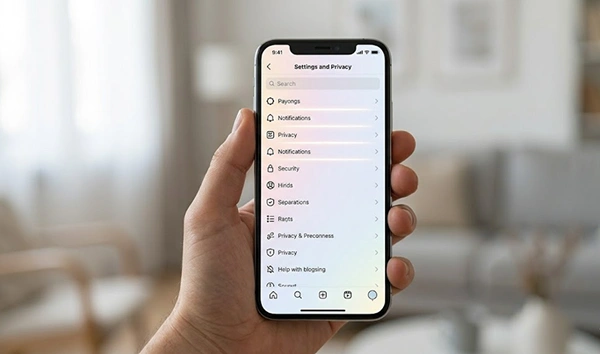
It is the quickest and most direct way to check what ads interest your profile.
Note: You may see the different menu labels depending on the Instagram app version. In case you can’t see ‘Ad interests’, check ‘About the ads you see’ or ‘Ad preferences’.
Meta equally shares the users’ data on Facebook and Instagram. Thus, you can check Instagram ad interests even through the Facebook Ad Preferences page. Here you can see more categories than on Instagram.
As per Meta’s official Ad Preferences Help page, users can check and remove interests that attract the type of ads they see on Facebook and Instagram.
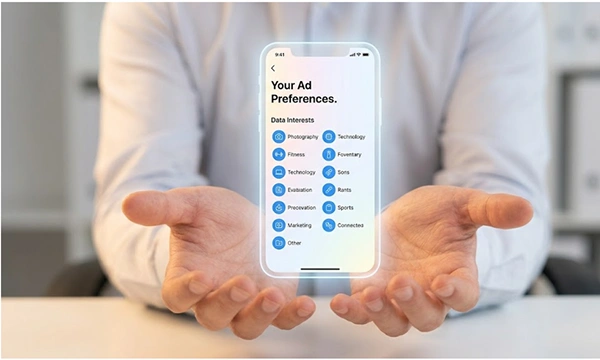
There are more than hundreds of categories in the Instagram ad interests list set in parent groups. Advertisers can pick the right ones from these categories in the Meta Ads Manager for running campaigns. Here is a list of the most common categories, subcategories, and their examples.
| Top-Level Category | Example Subcategories | Typical Advertiser |
| Fitness and Wellness | Yoga, Running, Gym, Nutrition, Mental Health | Supplement brands, fitness apps |
| Hobbies and Activities | Photography, Travel, DIY, Gardening, Reading | Camera brands, travel agencies |
| Family and Relationships | Parenting, Weddings, Pets, Dating | Baby brands, wedding planners |
| Education | Online Courses, Languages, Study Abroad, Universities | EdTech platforms, tutoring services |
| Entertainment | Movies, Music, TV Shows, Gaming, Podcasts | Streaming platforms, ticket sellers |
| Technology | Mobile Phones, Software, Electric Vehicles, AI | Tech companies, SaaS products |
| Business and Industry | Marketing, Finance, Entrepreneurship, Real Estate | B2B software, financial services |
| Shopping and Fashion | Luxury Goods, Streetwear, Beauty, Online Shopping | E-commerce, fashion retailers |
| Sports | Football, Basketball, Cycling, Martial Arts | Sportswear, equipment brands |
| Food and Drink | Cooking, Restaurants, Coffee, Veganism, Wine | Food delivery, cookware brands |
Pro Tip: Advertisers should not just go with categories. You had better find subcategories to target your audience precisely. Don’t just target the whole ‘Sports category’, instead go for ‘Running’ to target more specific people with less competition.
The hidden interests are subcategories in Meta’s ad system, which the standard browse menu fails to show. You can only access them through Meta Ads Manager. These are mostly niche-specific audiences that most advertisers ignore, which means lower cost and competition per click and more profitable campaigns.
Follow this process to get Instagram hidden ad interests as an advertiser:
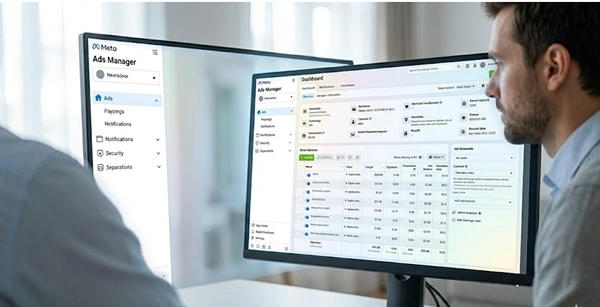

According to Coinis’ guide on Find Hidden Interests in Instagram Ads, if you use niche-specific keywords in Ads manager, it can show you multiple low-competition interest categories which the standard browse menu fails to expose.

If you use Instagram ad interests effectively, it means you layer them with other targeting options like testing narrow Vs broad audiences. Constantly improving based on the performance data leads to better results on a low budget. Choosing random interests without a proven strategy is risky and wastes money.
Here are some of the most effective strategies to use for interest-based audience targeting:
| Strategy | How to Apply It |
| Use interests with behaviours | Use ‘Fitness’ interest with ‘Engaged buyer’ behaviour to target users who buy fitness products |
| Update interest lists occasionally | The categories of Meta’s interest update with time; thus, check and update your list within 2 to 3 months. |
| Check narrow vs. broad audiences | Run two ad sets: one with 3-4 specific interests, another with one broad interest; now compare the cost with each result |
| Layer interests with demographics | Include gender, age, or income with interests to minimise the specific audience size and maximise results. |
| Exclude user interest | Excluding interests that target non-buyers, like ‘Students’, from a premium software campaign will waste money |
Note: Meta suggests targeting the audience size between 2 million and 10 million for profitable ad campaigns. The limited audience costs more and brings fewer impressions.
Users can always update or remove their Instagram ad interests at any time. When you remove an ad interest, it signals Meta not to show you ads from that category going forward. It never decreases the number of ads you see daily; this will only change the type of ads.
Here is how you can remove an Interest on Instagram




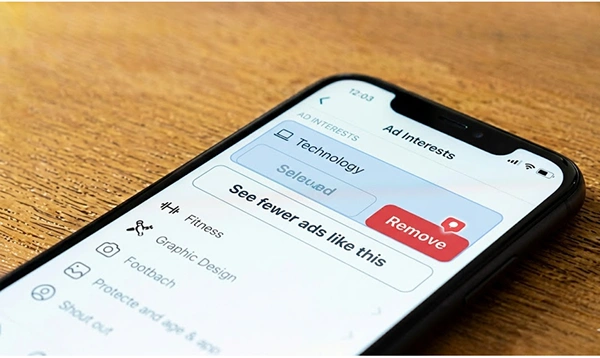
The ad interest you selected is removed from your profile in one go.
Note: Removing ad interests can’t delete your history in Meta’s record. It just stops showing you ads from the specific category you remove in the future.
These do’s and don’ts are really helpful for both a user who wants to protect their privacy and an advertiser who wants to run a profitable campaign on a lower budget.
Dos
Don’ts
Understanding how Instagram ad interests work lets you know how to manage ads or run campaigns. For people, checking the ad interests protects their privacy and improves their experience. The advertisers know how to get visible and hidden interests and subcategories in the Instagram ad interests list to run profitable campaigns on a low budget.
Open the Instagram application and follow the steps.
| Go to Profile → Menu (…) → Settings and Privacy → Ads → Ad Interests |
Now you can see the complete list of categories that Meta uses to determine which ads to show you on the app.
The list of Instagram ad interests is a group of categories that Meta sets to your account depending on your app activity. It covers Fitness, Travel, Technology, Cooking, and hundreds of subcategories.
Yes, follow these steps to remove your ad interests.
| Go to the Instagram app → Settings → Ads → Ad interests |
Choose the interest you want to remove and click “See fewer ads like this” or the button to Remove.
Advertisers use the keyword search method in Meta Ads Manager’s Detailed Targeting section. Typing a niche-specific keyword shows related subcategories that the standard browse menu fails to show. Moreover, the audience insights tool also helps you get the interests that your target audience has.
Not always, because Meta works on user behaviour to assign ad interests. If you watch a cooking video, it adds ‘Cooking’ as your interest even when you don’t have it.
Sources: