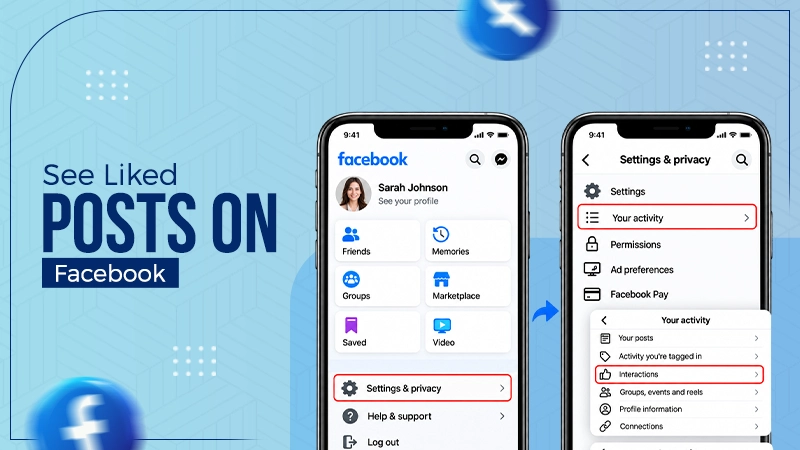
To see your likes on Facebook, you need to visit your profile and click the three dots (…) beside the edit profile. Now click Activity Log. These steps work on the latest Facebook app versions. This is how you can see your likes on Facebook without going to settings.
Blog
How to See Liked Posts on Facebook? Step-by-Step Guide
Ready to know how to see liked posts on Facebook quickly? Open your Facebook profile and go to Activity Log, and then tap Likes and reactions under your Facebook activity. There is no separate tab for liked posts; thus, the Activity Log is your only choice.
Here you will learn how to see likes on Facebook on mobile and desktop. Know how to find liked videos, pages, and fix problems.
Quick Answer
Here is how to see liked posts on Facebook:
- Go to your Facebook profile.
- Tap the three dots (…) menu under your bio on desktop.
- Click Activity Log → Select Your Facebook Activity → Comments and Reactions.
- Then choose Likes and reactions.
Now you can see everything you liked on Facebook.
Table of Contents:
- How to See Liked Posts on Facebook?
- How to Find Liked Videos on Facebook?
- How to Check Liked Pages on Facebook?
- How to Filter and Search Your Likes?
- Where Each Type of Like Is Stored
- How to Download a Full List of Your Likes
- Who Can See the Posts You Like
- Common Problems and Solutions
- Dos and Don’ts of Seeing Liked Posts on Facebook
- Conclusion
- FAQs
How to See Liked Posts on Facebook?
Facebook monitors and saves each and every reaction and like under Activity Log. Your log is private, and only you can access it. It stores your reactions to all photos, posts, videos, Reels, and comments. These steps show you how to check liked posts on Facebook with a desktop browser and mobile app.
How to See Posts You Liked on Facebook on Mobile App?
Follow these steps on how to see what you liked on Facebook, including photos, reels, posts, and videos.
1) Go to your Facebook profile.
2) Click the three lines menu at the top right corner.
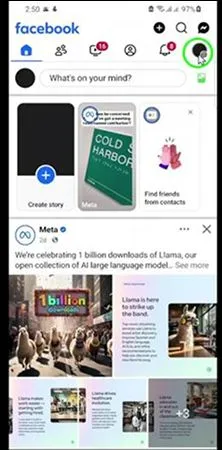
3) Click Settings & privacy.
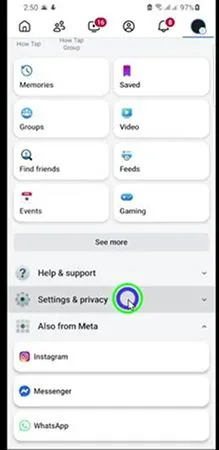
4) Click Settings now.
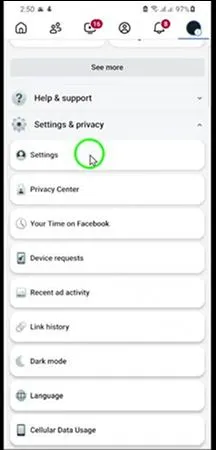
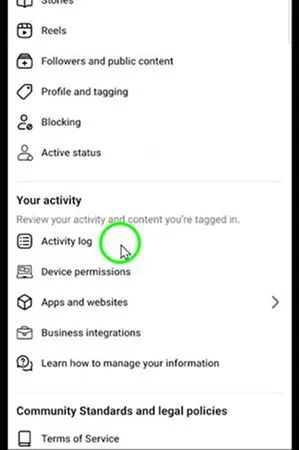
5) Open “Activity log” under the “Your activity” section.
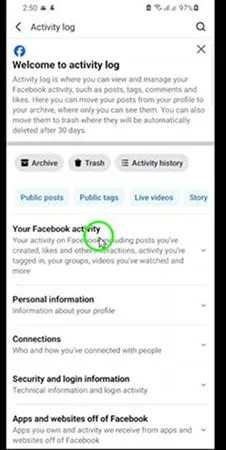
6) Open “Your Facebook activity.”
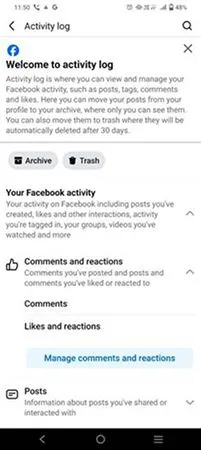
7) Click Likes and reactions under comments and reactions.
8) See all your liked posts on Facebook, with the newest at the top.
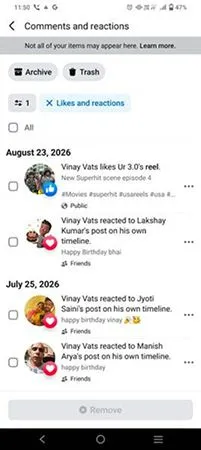
Note: Take help of the filter option to easily find the post by date or format.
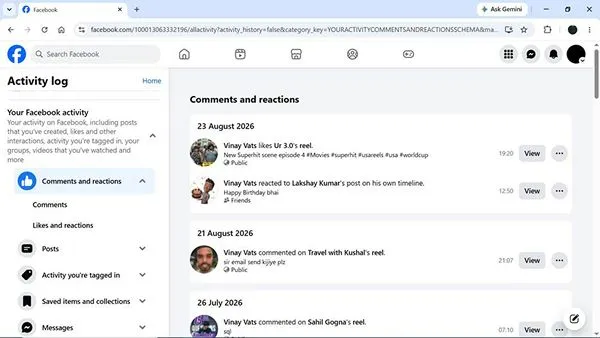
How to View Liked Posts on Facebook on Desktop?
Here is how to find liked posts on Facebook more quickly.
1) Open Facebook on a desktop browser.
2) Click on your profile photo at the top left corner.
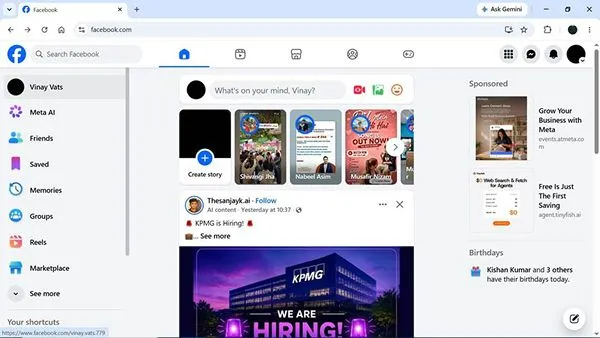
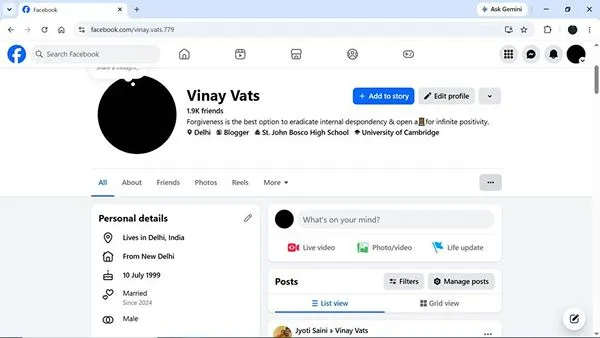
3) Tap the three dots (…) menu under your bio.
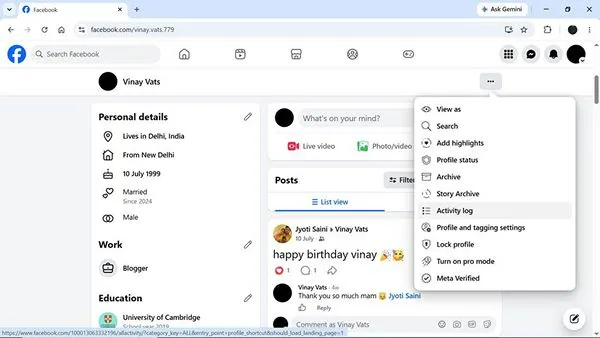
4) Click Activity Log.
5) Click your Facebook activity
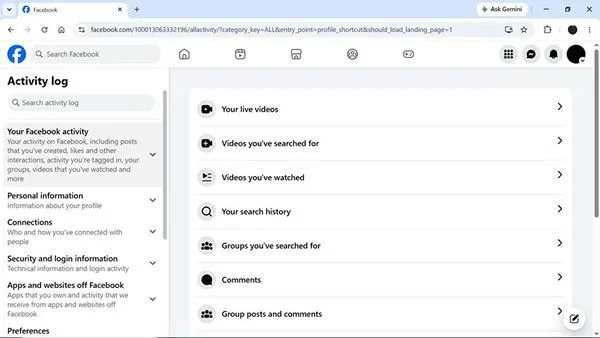
6) Select likes and reactions under comments and reactions.
How to Find Liked Videos on Facebook?
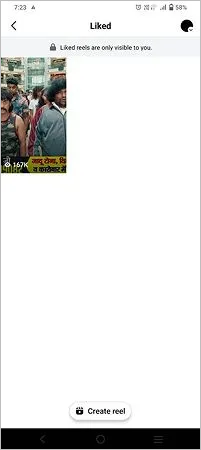
You will not get any separate section for liked videos on Facebook. There is only one tab for liked videos and reels. You can get it under the likes and reactions tab. According to Meta Help Centre, you can review reels that you have already liked or saved from the Facebook app only.
Here is how to see liked videos on Facebook with easy steps:
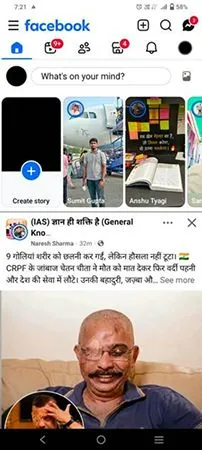
1) On the Facebook app, click the three-line menu in the top left corner.
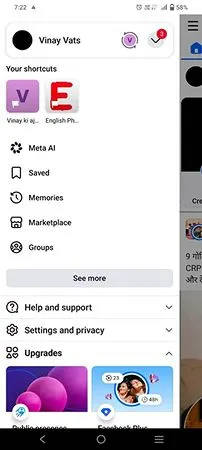
2) Click the Saved option.
3) Tap the “Reels” tab next to All.
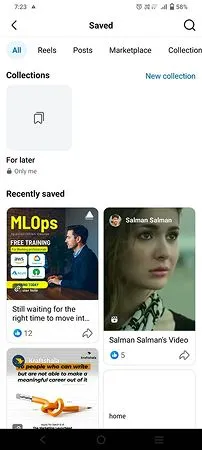
4) Click the Liked icon.
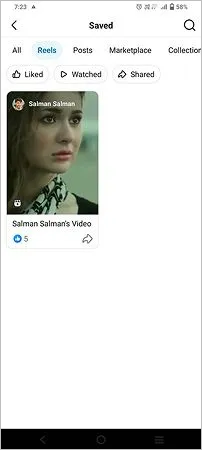
5) Here are all your liked Reels and videos.
How to Check Liked Pages on Facebook?
You cannot follow the same approach to check liked pages on Facebook as you do for liked posts. They are not available under the likes and reactions list. Facebook keeps the page likes under the page section.
Here is how to find likes on Facebook for pages:
1) Go to your Facebook profile.
2) Click the three lines menu at the top right corner.
3) Click Settings & privacy.
4) Click Settings now.
5) Open Activity Log under Your Activity section.
6) Open your Facebook activity.
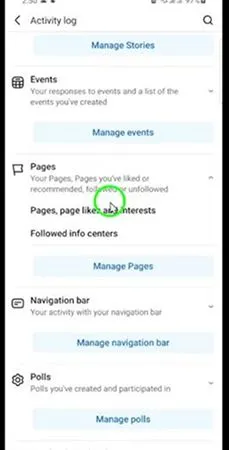
7) Look for the Pages section now.
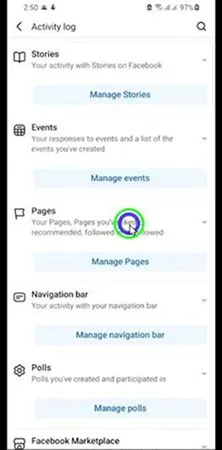
8) Choose the Pages, page likes, and interests option.
How to Filter and Search Your Likes?
Filters are the best tool to replace the long hours of scrolling. Suppose your account is approximately 10 years old; it must have thousands of reactions. Thus, the scrolling will be reloading slowly. But the filters option under the Activity log is the best alternative way to do the same thing in a few seconds.
- Date range: Go to the date range and choose the custom option and mention the start and end date.
- Sort: After getting the possible results, you sort the data either in ascending or descending order.
- Activity type: Checkmark all that you want to see, such as likes and reactions.
- Search: To make the searching process easier and quicker, write a possible keyword, page name, or your friend’s name.
Example: To search a recipe post from last December, you should set the date range to the month and search “recipe” as a keyword.
Where Each Type of Like Is Stored
Facebook has divided your likes into three different locations. Here you will know where you can find each type of post likes.
| Type of Like | Where to Find It |
| Complete like history file | Download your information. |
| Page likes | Profile → More → Likes |
| Posts, photos, comments | Activity log → Likes and reactions |
| Saved (bookmarked) videos | Menu → Saved |
| Videos and Reels | Activity log → Likes and reactions |
How to Download a Full List of Your Likes
To download a full and searchable copy of your every reaction, you need to take advantage of the download your information option. It will bring your like history as a JSON or HTML file. You had better do it before cleaning your data or deactivating your account.
1) Open your Facebook settings & privacy under the profile menu.
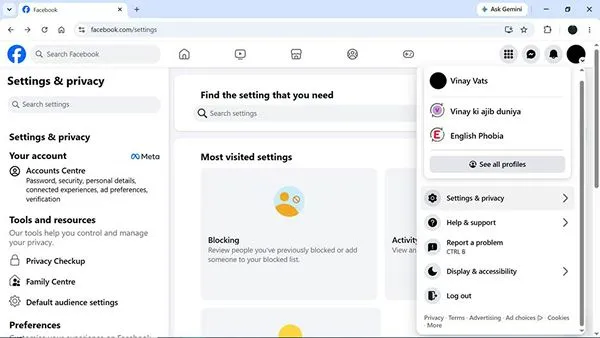
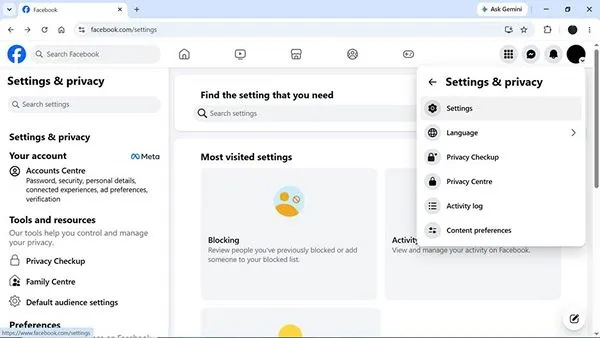
2) Go to Settings now.
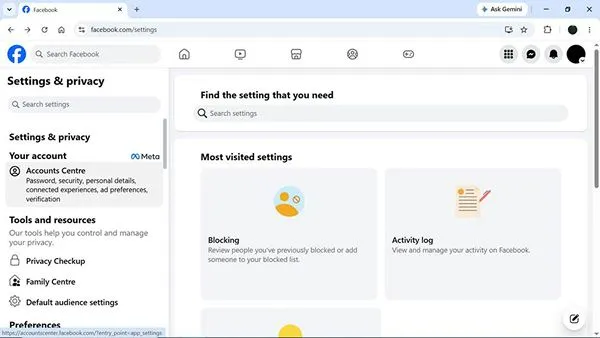
3) Click Accounts Centre at the left.
4) Select your information and permissions under account settings.
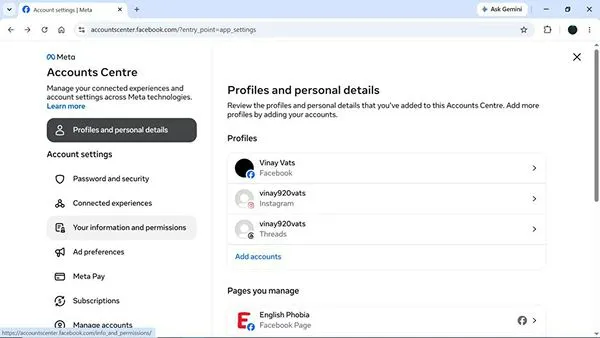
5) Click Export your information now.
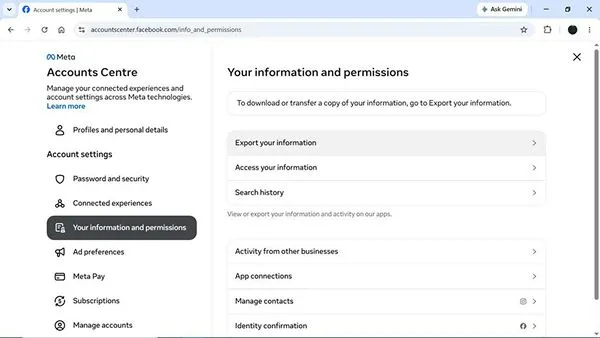
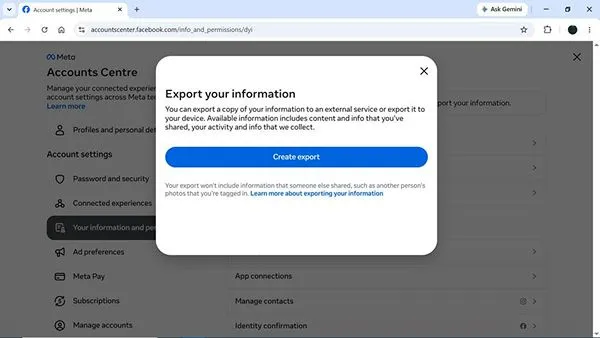
6) Continue to create the export.
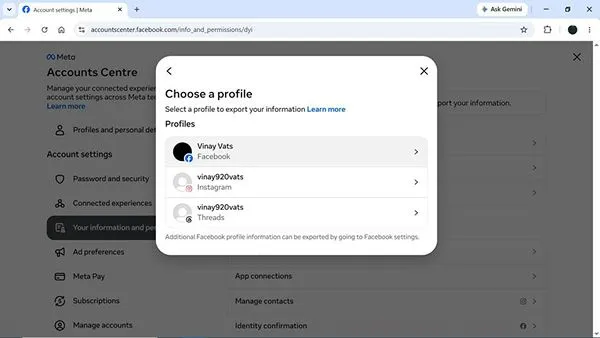
7) Choose a profile to export your information.
8) Select the location where you want to export the information.
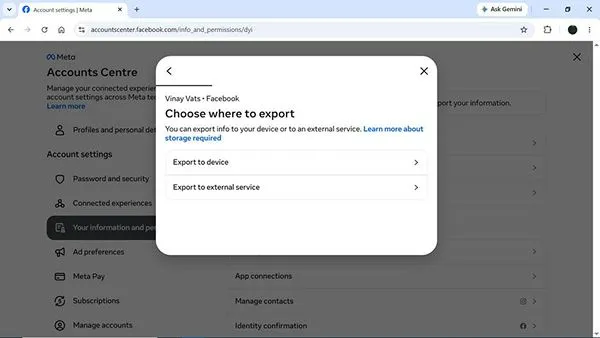
Later, just checkmark the data you want to export with date range and file format.
Note: You will get an email when your information is ready. But will have only 4 days’ time to download the files for security reasons.
Who Can See the Posts You Like
Although your activity log is private and only you have the right to access it. But your likes on the posts are not personal; these are available on the posts too. You had better keep these rules for visibility in mind.
- If someone has access to see a public post, they can also see your reaction to it.
- Your friends may possibly see your reaction in their feed or in the reaction list of the post.
- Likes on a post that is in a private group always remain visible to the group members only.
- If a reaction is removed from a post, it will disappear from not only your log but also from the post.
- You can hide page likes just by updating the privacy of the likes categories.
Common Problems and Solutions
Most of the issues users struggle with are accessing the activity log. The reasons can be either an outdated app version or incorrect steps for the menu. Here is the solution to common problems.
- Old likes are not available: Try using the date filter option rather than scrolling, as long lists may time out.
- A liked post is unavailable now: If the owner of the post archives, deletes, or changes settings to new content, you will not be able to see it.
- Shows blank page on desktop: You need to disable ad blockers, clear the cache, or try in a mobile app.
- Can’t see likes and reactions option: Go to your Facebook activity log, and then you can see comments and reactions. Only then will you get the likes and reactions section.
Dos and Don’ts of Seeing Liked Posts on Facebook
Check these important points to know everything about how to see my likes on Facebook.
Dos:
- Go to Activity Logs from your Facebook profile are the fastest way to see likes.
- Download your information before you delete or deactivate a Facebook account.
- Always check your page likes once every six months to update ad targeting and your feed.
- Use the filter option if available on your account to search for a specific post.
Don’ts:
- Never trust any third-party application that promises to expose likes. It violates Meta’s terms and can result in your account being restricted.
- You do not think that if you undo a reaction, it will erase everything. Because it can’t delete old notifications and screenshots.
- Don’t believe that there is a “Liked posts” page that shows everything you liked publicly.
Conclusion
By now you have learned how to see posts you liked on Facebook. Go to Activity Log, where you can see photos, reels, videos, and posts you liked under the Like and Reactions section. But Page likes are available under your profile’s Likes section. You can use the filter option if it is visible on your account. It helps you show data based on dates rather than scrolling through everything.
FAQs
How can you see your likes on Facebook without using Settings?
Is it possible for others to see my activity log?
No, others cannot see your activity log because it is private. Only you can access your activity log. But your reactions, such as “like,” “heart,” “love,” & “care,” are visible on the posts that your friends can see.
Why can’t I see some of my liked posts in the activity log?
You can only see the posts you liked that are still available on Facebook. If the owner changes privacy settings, leaves a group, deletes posts, or even archives them, you will no longer be able to see them in your activity log.
How can I find my liked videos on Facebook easily?
Go to your Facebook profile and open the activity log from the menu options. Now click Likes and Reactions to see all the videos and reels you have ever liked or reacted to. You can use the filter option if it is available on your account.
If I leave a post, will it disappear from my activity log?
Yes, if you remove a reaction from a post, it will disappear from both your history and the post too. Facebook will not notify anybody about this removal. However, the earlier notification for your reaction still remains as it is.
Is there any way to see the posts someone else liked?
No, you can’t see posts that someone else liked. But you can view his liked pages in case his About section is public. Nevertheless, Facebook does not show you a list of photos, videos, or posts that other users liked.
Sources:
Find your Facebook activity log – by Facebook Help Centre
How to Use activity log to find specific content: – by Facebook Help Centre
See reels and videos you have saved or liked – by Facebook Help Centre
How to see posts you liked on Facebook by Android Authority
Export a copy of your Facebook information – by Facebook Help Centre
Related Post's