
No, Instagram Direct is a part of the Instagram mobile app and website. Instagram created a separate Direct app in 2017 but shut it down in 2018. Today you can find your DMs through the messenger icon from your feed.
Blog
Instagram Direct: What It Is and How to Send DMs in 2026
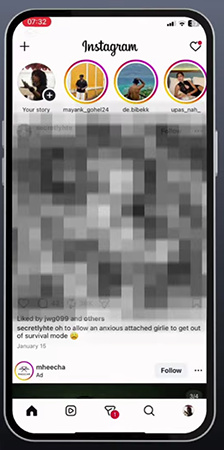
Instagram Direct is a private messaging system within Instagram where you can find all your Instagram DMs. You can use this tool to send messages, photos, videos, reels, and posts to a single person or even a group. Click the paper plane icon to open it from the bottom of the screen.
Here, you will learn about Instagram Direct, its usage, new features in 2026, and the privacy policy.
Quick Answer:
What is Instagram Direct?
Instagram Direct is a private messaging feature offered by Instagram, which was launched on Dec 12, 2013. At first, it was used to share photos or videos with your friends. But now you can use it to chat privately or in groups to share photos and videos, make calls, and even schedule or translate texts through both the mobile application and the web.
Table of Contents:
- What is Instagram Direct?
- How to Find and Send Instagram Direct Messages
- Key Instagram Direct Features in 2026
- How The Instagram DM Inbox Works
- Instagram Direct for Businesses
- What Changed about Privacy and Safety in 2026?
- Common Instagram DM Problems and Fixes
- Dos and Don'ts of Instagram Direct
- Conclusion
- FAQs
What is Instagram Direct?
Instagram Direct is Instagram’s private messaging feature. While others can see posts and comments on Instagram, Instagram DMs can only be accessed by the users in the conversation. All Instagram Direct, IG Direct, and Instagram DMs refer to the same feature.
Originally, it was launched as an inbox for sharing photos; it has expanded into a complete messaging service within Instagram over time.
There are some content types you can share, such as
- Pictures and videos captured through your phone gallery or directly from the chat camera.
- Emojis, text messages, stickers, and GIFs.
- View-once images or videos that disappear when someone sees them once.
- Your profile, stories, and reels shared from your Instagram feed.
- Voice messages as well as audio and video calls.
How to Find and Send Instagram Direct Messages
Instagram DM can be sent from both mobile apps and desktop browsers. There are some easy steps to follow on both systems.
1. How to Send Instagram Direct Messages on Mobile
- Open the Instagram app.
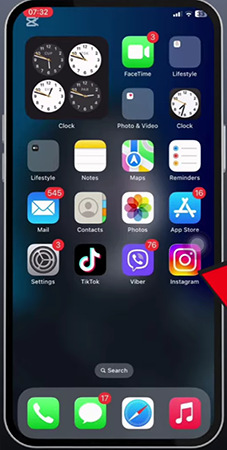
- Click on the Messenger icon (paper plane icon) at the bottom.
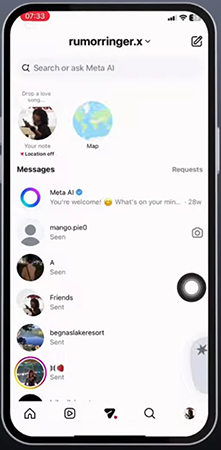
3. Now click the person or group you want to send a message to.
4. Enter your message and click on the Messenger icon next to the typing area.
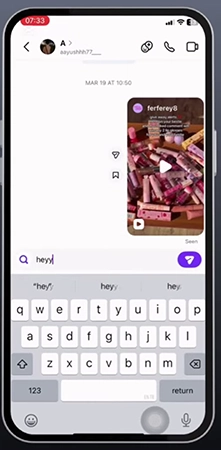
Tips: You may also select Message from someone’s profile to open the chat window.
2. How to Send Instagram Direct Messages on Desktop
- Sign in to Instagram from a desktop browser.
- Tap the message from the left-side menu.
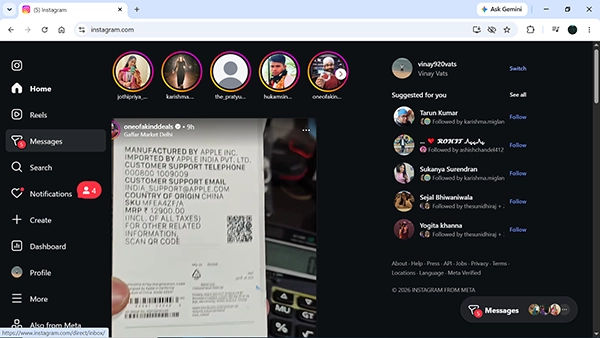
- You can either search the person’s username or choose the one from the chat.
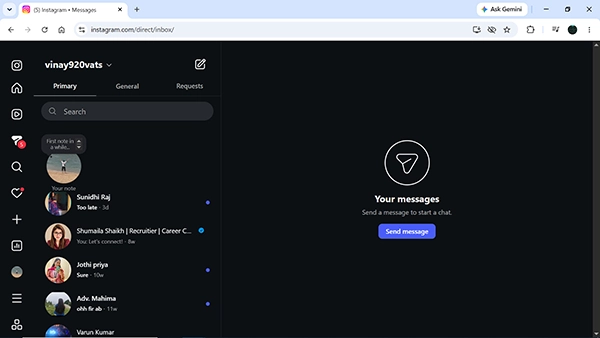
- Select the person you want to message and click on the chat.
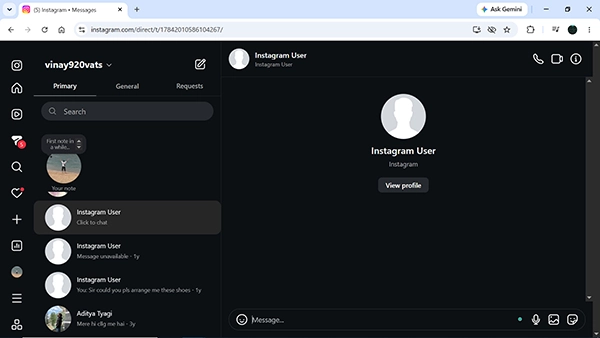
- Lastly, write your message and press Enter to send it.

Note: You can select more than one person to create a group chat that can involve up to 250 people.
Key Instagram Direct Features in 2026
Instagram Direct presented some features like messaging, editing, scheduling, and translating in 2024. Here are some helpful features provided in the table below:
| Feature | What it does | How to use it |
| Edit messages | It allows the user to correct a sent message within 15 minutes. | Tap and hold the message, then click on Edit. |
| Pin chats | It can pin up to 3 chats to the top of your inbox | Swipe left or press and hold on a chat, then click on Pin. |
| Schedule messages | It allows users to send a message to a chosen date and time. | Tap and hold the send button and select a time. |
| Translate | It converts a message to another language. | Press and hold the message and click on Translate. |
| Music stickers | It allows you to share a 40-second preview of a song. | Open the sticker tray and tap Music. |
| Group QR codes | Makes it easy for users to scan a QR code to join the group chat. | Open the group chat settings and click the QR code. |
It was announced by Meta that you can edit any sent message within 15 minutes and up to 3 group chats or one-to-one chats at the top of your inbox. Instagram supported 99 translations at the start, and the music feature allows you to share a 30-second preview of a song from Instagram’s library.
New in 2026: Instagram is introducing new features in 2026, such as users being able to record videos using the instant DM camera. Instagram+ subscribers will be provided with custom fonts in DMs, and they will be able to read messages without another person getting the “seen” message. In addition, with Meta AI, you can turn your few words into a song that you can send via your DMs.
These features become available in phases; hence, some accounts may not be able to use them.
How The Instagram DM Inbox Works
The inbox categorizes your Instagram DMs into different folders to keep your important conversations in sight.
- Primary: There are conversations with people you follow and talk to regularly. Notifications are enabled for them.
- General (professional accounts): Conversations that are less important, and notifications are not enabled by default.
- Requests: It shows messages from non-followed accounts. These stay separate until you accept the request.
Instagram is still continuously working on Inbox. Features like the multi-select filter and creation of a new inbox folder were introduced by Instagram in September 2025. It launched the “10K followers” filter in January 2026.
Instagram Direct for Businesses
Companies and content creators use Instagram Direct for customer service, sales, and as a lead generation tool. There are some main uses for businesses below:
- Customer Support: Answering privately to customers’ questions about orders, size, and delivery issues.
- Saved replies: Save responses to send for the same question to users.
- Click to message ads: Ads that allow users to message directly instead of visiting a company’s website.
- Broadcast Channels: Share bulk messages to users who have opted in.
- Approved Automation: Using approved Meta tools to provide automated quick replies, such as while commenting on a post.
Insight from practice: Check the requests and general folder daily. Potential customers who don’t follow you may message you there. You will lose them if you don’t contact them quickly.
What Changed about Privacy and Safety in 2026?
Instagram DMs no longer offer end-to-end encryption: Meta stated that the feature would not be available after May 8, 2026, and it was never set as the default. The reason behind it is that very few people used this feature, and it referred those who were interested in encryption to WhatsApp.
In simple words, Instagram messages are safe from other users but can be visible to the platform. There are safety tools below that you need to follow:
- Message Controls: Select who can send you messages or join you in groups.
- Restrict: You can limit someone without directly blocking them.
- Block and report: Use this to block malicious accounts and report them to Instagram.
- Hidden Words: Automatically filters offensive or unwanted messages.
Common Instagram DM Problems and Fixes
If you face issues with Instagram DMs, the reason may come from settings, application versions, or internet problems. Here are some tips to fix them.
- Messages not sending: Make sure your internet connection is working well, update Instagram, or sign out and sign in again.
- Missing messages: Go to the message requests or the hidden message folder to see if your messages are there.
- No Edit Option: Instagram allows you to edit a sent message within 15 minutes.
- New feature not showing: New features take time to reach everyone, so update your app and wait.
- Can’t message someone: If you are unable to message someone, the person may limit who they receive messages from or may have blocked you.
Dos and Don’ts of Instagram Direct
If you want to keep your Instagram private and safe, you must follow these dos and don’ts:
Dos:
- Disable read receipts if you need more privacy.
- Check your message requests daily.
- Schedule messages if you want to wish someone a happy birthday.
- Report spam messages if you are asked for money or OTPs.
Don’ts:
- Don’t send your login credentials, bank information, or OTPs via DMs.
- Don’t think that your chats are fully protected since they are not encrypted anymore.
- Don’t send too many messages to unknown users because Instagram can limit your account.
Conclusion
Instagram Direct is a secure inbox on Instagram, which is used for messaging, sending media, and making calls. Recently, it has included features like editing, pinning, scheduling messages, and translations. But end-to-end encryption was disabled in 2026, so you had better use another app for sensitive conversations.
Check out your inbox and message settings now; use the new feature from Instagram Direct.
FAQs
Is Instagram Direct a separate app?
Can I unsend an Instagram message?
Of course, you can unsend a message by simply tapping and holding the message and clicking on Unsend; it will disappear for everyone in the chat. But the person may have read the message or taken a screenshot, so be careful.
Are Instagram DMs end-to-end encrypted?
No, Meta no longer supports end-to-end encryption of Instagram chat after May 8, 2026 because most of the people were not using it. For encrypted messages, Meta recommends WhatsApp, which automatically encrypts all chats.
How many people can join an Instagram group chat?
Instagram allows up to 250 people in a group chat. For adding more users, you can use a chat window or share invite links and QR codes. The group admin can switch invite links off at any time.
Can I schedule Instagram DMs?
Yes, enter your message, then click and hold the send button. Select a date and time, and then click Continue. But scheduling works only for text messages and is best for greetings, reminders, and follow-ups.
Why can’t I see some of my Instagram DMs?
Messages from people whose account you don’t follow may appear in your requests or hidden requests folder. Professional accounts have a general folder as well. If you are still unable to see messages, update the app.
Sources:
Introducing Instagram Direct Message by Instagram
End-to-end encryption on Instagram by Instagram Help Center