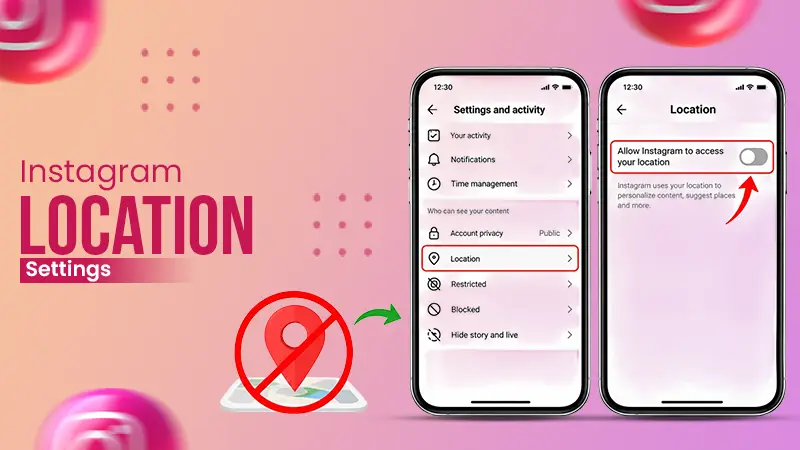
No, location sharing remains turned off by default on Instagram. According to Meta, your location is shared only when you enable it. To confirm, it shows No one; go to your DMs → Map → Settings.
Blog
How to Turn Off Location on Instagram in 2026 with Simple Steps
If you want to know how to turn off location on Instagram, you have to block it from three different places. Keep the Instagram Map location sharing set to No One, don’t allow Instagram location access from your device settings, and remove location tags from old posts.
In this article, you will learn to turn off location on Instagram on Android and iPhone, extra privacy tips, and quick fixes.
Quick Answer:
How to turn off location on Instagram?To turn off location on Instagram, you need to open your device’s Settings first, then select Instagram from the apps, and finally tap Location and set it to Never for iPhone and Don’t allow for Android.
Table of Contents:
3 Types of Location on Instagram
Instagram can use your location in different ways. Each one has its own unique off button. Most of the guides cover only one. This is the reason why users can still see their posts on the Map even when they have turned off location.
Know the difference between device permission, Map sharing, and location tags before editing anything.
| Location Type | What It Does | Where to Turn It Off |
| Device location permission | Allow the app to read your device’s GPS | Phone Settings app |
| Location tags | Includes a place name to a post, Story, or Reel | Edit each post |
| Map sharing | Shows your last active location to selected friends only | Instagram Map settings |
Note: Your device and the Map settings work differently. If you turn off one, it will not turn off the other; therefore, you had better turn off both separately.
How to Turn Off Location Sharing on Instagram Map?
If you want to turn off location on Instagram Map, you need to set your location sharing to “No one”. Instagram Map was launched in August 2025 in the US and later came to India in October 2025. When you turn it on, your location gets automatically updated each time you use the app or even if it is running in the background.
Below are the steps to turn off location on Instagram on both iPhone and Android.
How to Turn Off Location on Instagram on iPhone?
The best way to turn off location on Instagram is to block access in iOS settings. It will not let the app use your GPS at all, and the Map is unable to update your location without it. Below are the steps to do it;
- On Instagram, click the menu icon at the bottom right.
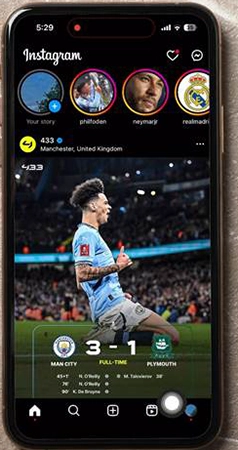
- Click the three-line menu at the top right.
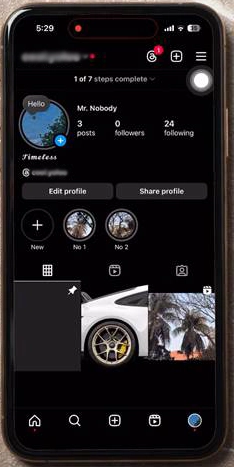
- Scroll down to Device Permissions under Settings and activity.
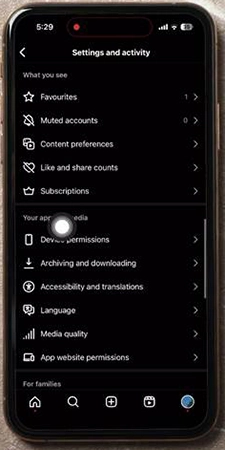
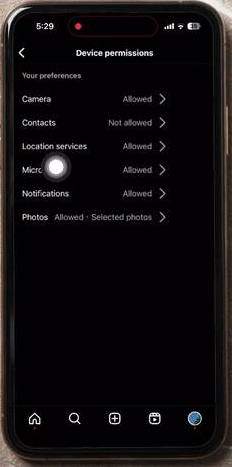
- Tap Location Services
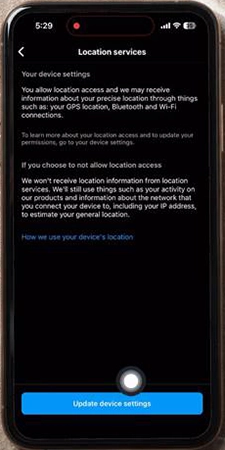
- Click Update device settings.
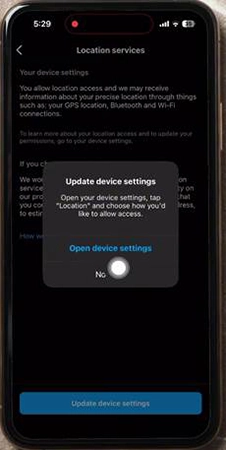
- Select Open device settings from the pop-up.
- Click Location.
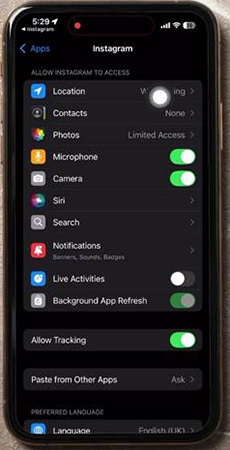
- Set location access to Never.
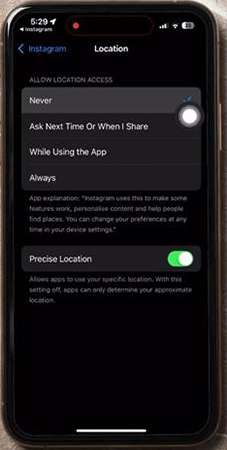
How to Turn Location Off on Instagram on Android?
Here is how to turn location off on Instagram on Android phones. Revoke the location permission from the application. You may find the menu names slightly different on OnePlus, Samsung, Pixel, and other brand phones, but the method remains the same.
- Go to your device settings.
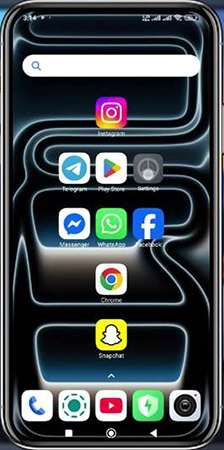
- Click Apps.
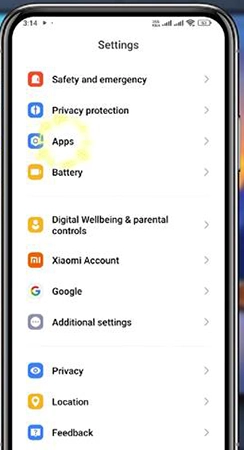
- Click Manage apps.
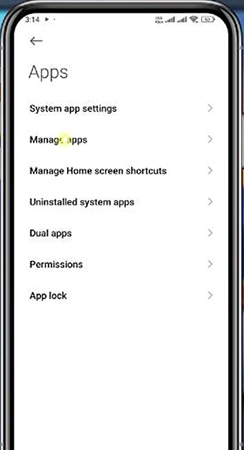
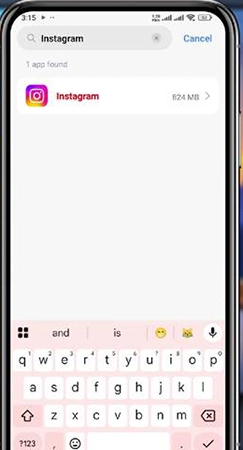
- Type Instagram in the search box.
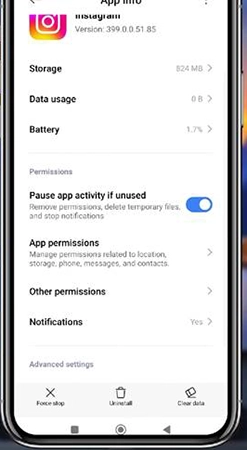
- Click App Permissions.
- Now tap Location.
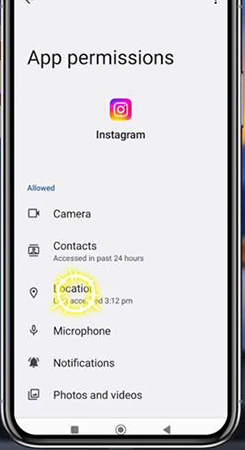
- Choose Don’t allow.
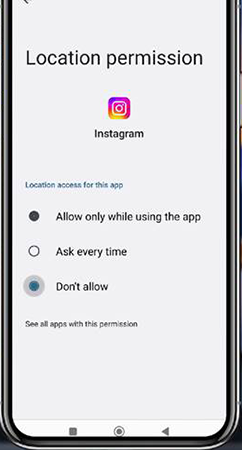
If you prefer Ask every time, you had better turn off Use precise location.
Tip: This page is also connected to Instagram Settings and activity → Device permissions in the app.
Additional Privacy Controls to Know
If you wish to continue sharing your location with a few users, Instagram allows you to have finer controls rather than just an ordinary on or off switch. These controls will help you share safely rather than selecting either no one or all.
- Hide from: Open map settings and click the three dots on the sharing box, then select the specific accounts you want to hide your location from.
- Hidden places: Add some places such as school, home, or workplace. This feature will not show your location on the map as long as you are there.
- Limited audience: Select either only these friends or close friends rather than choosing all the followers.
- Teen supervision: Parents receive a notification in case a supervised teen begins to share location. They can also see with whom the teen shares.
- Status indicator: It is a label at the top of the Map that shows whether your device location is turned off or you are sharing it with someone.
What Happens After You Turn Off Location
When you turn off location on Instagram, your friends will not be able to see your last active location on the map. However, here are a few things that remain the same:
- You will be able to open the map and check content tagged to locations.
- Old tagged posts will be available as long as you do not remove each one of them.
- You can still search for any location and tag it by hand.
- Instagram might also estimate a general area from your internet connection.
- Friends who all share their posts on Instagram will be available on your Map.
Quick Solutions to Common Location Problems
Almost every location issue occurs due to mixing up three types of locations on Instagram. Here are quick solutions for them;
- Unable to locate the map: Firstly, you need to update the Instagram app. Since it is a rolled-out feature, it may not be available in every country as of now.
- You can still see your photo on the map: this is more likely a note or a tagged post, but not your live location. You can remove it at any time.
- You use the Instagram app on two devices: Both phones have different permissions; therefore, you need to change it for both individually.
- Map shows “Turn on Location Services”: If you see this message, it means your device location is already turned off, which guarantees that you are not sharing your location.
Dos and Don’ts of Location on Instagram
Make sure to keep these dos and don’ts in mind to protect your privacy and location on Instagram.
Dos:
- Keep your residential, official, and school locations as Hidden Places.
- Always remove location tags from old posts tagged at home.
- Inform teens about the risks of sharing location and use supervision tools.
- Make sure to check Map settings set to No one after a major update.
Don’ts:
- Do not share a post or story with all your friends in case your following list has strangers.
- Never tag a Story while you are still present at the location.
- Do not think that your device settings can remove location tags from your old posts.
Conclusion
Now you know how to turn off location on Instagram using both methods: one is the Map screen, and the other is Settings and activity. Set location sharing to No one from the Map, and disable location access from your device settings. You can even remove tags from previous posts. Apply all three steps for complete privacy. It takes less than a minute to check your Map settings and update a post tagged at home.
FAQs
Does location sharing on Instagram remain turned on by default?
Will users see my location if I just tag a post on Instagram?
No, they will just be able to see the place you just tagged and not your live location. Stories, Reels, and tagged posts can be available on the Instagram Map for your followers. Therefore, you had better either remove the tag or post only when you have left the place
How can I turn off precise location on Instagram?
To turn off your precise location on Android, go to Settings → Apps → click Instagram → Permissions → Location and turn off Use precise location.
For iPhone, open Settings → Privacy & Security → Location Services → click Instagram and turn off precise location.
Is it possible to remove the Instagram map completely?
No, there is no way to delete the Instagram map tab from your DMS. All you can do is stop sharing on it. Update location sharing to no one and turn device location access off. This is how you can hide your live location going forward.
If I turn off my location on Instagram, will it disappear from my previous posts?
No, if you turn off your location on Instagram, it will still show for your old posts. Because when you turn it off, it will only stop accessing the new location but can’t remove it from old posts.
Sources:
Add or edit the location of an existing Instagram post by Instagram<
Add a location before sharing your post on Instagram by Instagram